Oxygen AI Positron 8.0 for Desktop unifies the AI Positron Assistant and AI Positron Assistant Enterprise add-ons into a single add-on.
AI assistance is now more effective with project-aware context prompts that allow chat and AI actions to follow project-specific style guides, as well as new tools such as project-wide search, directory listing, precise edit operations, and XML refactoring.
You can create multiple connections to each supported AI service, with new options including an AWS Bedrock connector and models like OpenAI GPT-5.1, Claude Sonnet 4.5, Claude Haiku 4.5, and xAI Grok 4 Fast, giving you greater flexibility in choosing the right AI assistance for your tasks.
This version introduces an experimental local Model Context Protocol (MCP) server that lets desktop AI assistants start Oxygen and use its tools for validation, editing, and refactoring.
In Web Author, AI-powered new file creation generates starter documents from prompts and attachments (XML, Markdown, images, or PDFs and Office files). In Content Fusion, project-wide search is available as an AI tool, improving agentic chat performance. The chat area is also cleaner, with attachments as chips, context inspection, quick action invocation, and richer tool-call details.
There are changes in:
Oxygen AI Positron for Desktop
A New Unified AI Positron Add-on
The separate Oxygen AI Positron Assistant and Oxygen AI Positron Assistant Enterprise add-ons are now combined into a single Oxygen AI Positron add-on. The functionality specific to the previous Enterprise variant, which allowed you to connect to your own AI provider, remains an enterprise-level feature that requires an Enterprise license, either for the host application or for Oxygen AI Positron. Previous users of both add-ons benefit from this unification: non-Enterprise users have more functionality that was previously available only in the Enterprise version, such as the Model Context Protocol (MCP) support, while Enterprise users will also be able to connect to the Oxygen AI Positron Service as an AI provider.
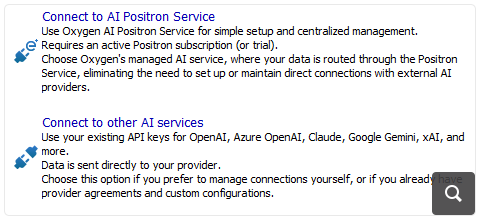
Support Multiple Connections to AI Service Providers
You can now create multiple connections to supported AI service providers. This allows you to access different AI models from various providers and switch between them based on your specific task requirements, giving you more flexibility in choosing the right AI assistance for your work.
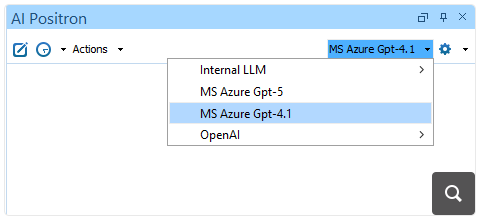
New Dedicated Connector: AWS Bedrock
You can now connect AI Positron to the AWS Bedrock service using a dedicated connector. Get instant access to enterprise-grade AI models with simple API key authentication, real-time streaming responses, and multi-modal capabilities.
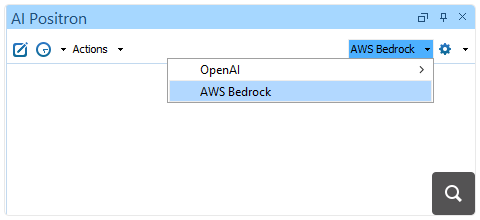
Smarter AI Context Prompt Setup
You can now use the Generate agent instructions action (available in the Welcome pane or in the Intelligent Agents actions) to create a project context prompt. This prompt helps the AI understand the structure and conventions of your documentation project, so that AI-generated content matches your project’s specific organization, framework, and metadata requirements. The generated prompt is saved as a Markdown file in your project and is used by AI Positron when you use chat or other AI actions.
Edit Document Tool
When using agentic chat to make changes to topics, small changes (e.g., attribute values, spelling corrections) can now be made more easily by the AI engine using the newly available edit_document tool that performs exact string replacements in a specified file.
List Directory Tool
When using agentic chat, a new list_dir tool is available to list the contents of a directory, which helps the AI understand the structure of your project.
XML Refactoring Tools in Chat Modes (Oxygen 28.0 Required)
XML refactoring tools are now available in the Agent and DITA Agent chat modes. This lets you quickly restructure your XML content, such as adding, removing, or moving elements and attributes, or applying custom XSLT transformations, without leaving the chat interface.
Project-wide Search Tool (Oxygen 28.0 Required)
The new grep_project tool allows the AI to quickly find precise matches across your project files. It supports wildcards (for example, *.dita), regular expressions, and XPath filters, making searches both flexible and powerful. By leveraging this tool, the AI can efficiently explore your project, resulting in improved performance on complex agentic tasks.
AI-Powered New File Creation (Oxygen 28.0 Required)
When creating a new file in Oxygen, you can enter a prompt in the new AI prompt input area and attach relevant text files (plain text, XML, Markdown), images, or documents (PDF, Word, PowerPoint) to guide the AI in generating content for your new file. The generated output appears in the AI Positron chat view, where you can continue the conversation to refine it further, if needed.
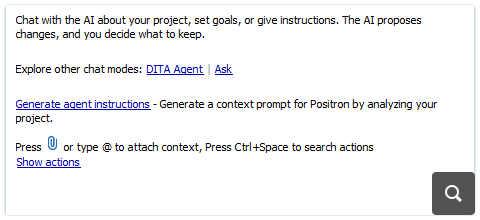
Chat Welcome Screen
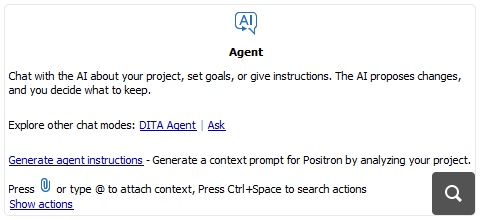
A useful welcome screen is displayed before you start a chat with the AI. It contains general instructional information and links to quickly change the chat mode (Ask, Agent, or DITA Agent). There is also a Show actions link that you can use to see the list of all available predefined AI actions.
Oxygen XML as a Local Model Context Protocol Server (Experimental, Oxygen 28.0 Required)
You can now configure Oxygen XML as a local Model Context Protocol (MCP) server, allowing AI assistants (such as Claude Desktop) to start the Oxygen XML application and to interact with the Oxygen XML tools, for example to invoke tools for validating, editing, and refactoring XML documents.
Model Context Protocol Improvements
The Model Context Protocol integration now provides more configuration options. You can specify header values for the connections that use the Streamable HTTP protocol, for example to pass an "Authorization" header, and use editor variables to access environment variables or system properties. It is also possible to define input fields, allowing the application to ask for a value, such as an access token, instead of storing the value in the configuration file. For security reasons, each tool call to an MCP server requires user approval to run.
Autocomplete Development Action (Oxygen 28.0 Required)
A new AI Autocompletion support provides real-time, context-aware code and markup suggestions as you type, at the caret location. It can also be triggered on request using the Autocomplete action. In this latter case, the chat view will show the action and you can further refine its result if needed.
Generate Code Improvements (Oxygen 28.0 Required)
The Generate Code development AI action now provides the structure of the associated XML file in the prompt, ensuring better results. For XSLT and XQuery, it includes the structure of the XML document associated in the transformation scenario, while for schemas (XSD, Schematron, DTD, RNG, RNC), it includes the structure of an instance that has the schema associated in a validation scenario.
Enhanced Project Content Search Options (Oxygen 28.0 Required)
When the AI searches for related content in your project it is provided with tools that have parameters to specify the page size, page number, and whether to match all or only some of the keywords. This gives more flexibility when AI is retrieving relevant documents from your project.
OpenAI GPT-5.1 Models Available
The flagship GPT-5.1 and GPT-5.1 Thinking models are now available in the list of OpenAI models to choose from.
xAI Grok 4 Fast Models Available
The latest fast models for xAI Grok are available to choose from, including Grok 4 Fast and Grok 4 Fast (Non Reasoning).
Claude Sonnet 4.5 Model Available
The Claude Sonnet 4.5 model (listed as their strongest model for building complex agents) is now available in the list of AI models to choose from.
Claude Haiku 4.5 Model Available
The Claude Haiku 4.5 model (listed as their latest small model) is now available in the list of AI models to choose from.
Improved Tool Names and Descriptions
All the names and descriptions of tools that are available in the chat or AI actions were improved for greater accuracy and relevance. This allows the AI to better decide what tool to call and what parameters to pass, thus improving the agentic AI workflows.
Additional Context Files
The main AI Positron Preferences page now allows you to specify multiple context prompt files that contribute to the project context prompt for all chat sessions and AI actions, leading to more relevant and useful responses from the AI.
Custom Actions Prioritized
Your custom actions are now displayed before the built-in actions wherever AI actions are shown, so you can access them more quickly.
Oxygen AI Positron for Eclipse
New Dedicated Connector: AWS Bedrock
You can now connect AI Positron to the AWS Bedrock service using a dedicated connector. Get instant access to enterprise-grade AI models with simple API key authentication, real-time streaming responses, and multi-modal capabilities.
Smarter AI Context Prompt Setup
You can now use the Generate agent instructions action to create a project-specific context prompt. This prompt helps the AI understand the structure and conventions of your project, so that AI-generated content matches your project’s specific organization, framework, and metadata requirements. The generated prompt is saved as a Markdown file in your project and is used by AI Positron when you use chat or other AI actions.
Edit Document Tool
When using agentic chat to make changes to topics, small changes (e.g. attribute values, spelling corrections) can now be made more easily by the AI engine using the newly available edit_document tool that performs exact string replacements in a specified file.
Generate Code Improvements (Oxygen 28.0 Required)
The Generate Code development AI action now provides the structure of the associated XML file in the prompt, ensuring better results. For XSLT and XQuery, it includes the structure of the XML document associated in the transformation scenario, while for schemas (XSD, Schematron, DTD, RNG, RNC), it includes the structure of an instance that has the schema associated in a validation scenario.
OpenAI GPT-5.1 Models Available
The flagship GPT-5.1 and GPT-5.1 Thinking models are now available in the list of OpenAI models to choose from.
xAI Grok 4 Fast Models Available
The latest fast models for xAI Grok are available to choose from, including Grok 4 Fast and Grok 4 Fast (Non Reasoning).
Claude Sonnet 4.5 Model Available
The Claude Sonnet 4.5 model (listed as their strongest model for building complex agents) is now available in the list of AI models to choose from.
Claude Haiku 4.5 Model Available
The Claude Haiku 4.5 model (listed as their latest small model) is now available in the list of AI models to choose from.
Improved Tool Names and Descriptions
All the names and descriptions of tools that are available in the chat or AI actions were improved for greater accuracy and relevance. This allows the AI to better decide what tool to call and what parameters to pass, thus improving the agentic AI workflows.
Custom Actions Prioritized
Your custom actions are now displayed before the built-in actions wherever AI actions are shown, so you can access them more quickly.
Oxygen AI Positron for Content Fusion
Uncluttered Chat Input Area
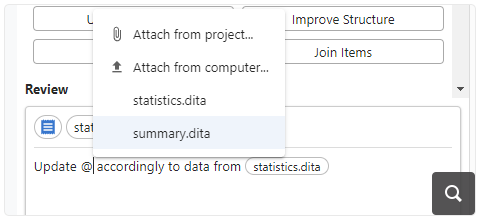
Attachments that you add to your conversation to provide additional context are now presented above the chat input area, ensuring that they do not clutter your instructions. You can still reference specific attachments inline within your instructions by using the @ symbol followed by the file name.
Project-wide Search Tool (Oxygen Content Fusion 9.0 Required)
The new grep_project tool allows the AI to quickly find precise matches across your project files. It supports wildcards (for example, *.dita), regular expressions, and XPath filters, making searches both flexible and powerful. By leveraging this tool, the AI can efficiently explore your project, resulting in improved performance on complex agentic tasks.
OpenAI GPT-5.1 Models Available
The flagship GPT-5.1 and GPT-5.1 Thinking models are now available in the list of OpenAI models to choose from.
xAI Grok 4 Fast Models Available
The latest fast models for xAI Grok are available to choose from, including Grok 4 Fast and Grok 4 Fast (Non Reasoning).
Claude Sonnet 4.5 Model Available
The Claude Sonnet 4.5 model (listed as their strongest model for building complex agents) is now available in the list of AI models to choose from.
Claude Haiku 4.5 Model Available
The Claude Haiku 4.5 model (listed as their latest small model) is now available in the list of AI models to choose from.
Inspect Chat Context
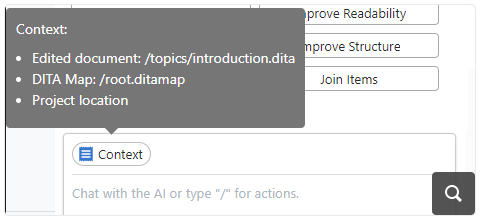
You can see the main context information that is sent to the AI for the current chat by hovering over the Context chip that is displayed above the chat input area. This adds clarity about the information the AI has available when processing a request. That information includes the editor selection (if available), edited document location, the DITA map location, and the project location (applicable when editing in the Personal Workspace).
Invoke AI Actions with Keyboard Shortcut
You can quickly invoke AI actions by using the / symbol in an empty chat, then start typing the name of the action. This displays a pop-up menu with a list of available actions that match the text you entered.
Edit Document Tool
When using agentic chat to make changes to topics, small changes (e.g. attribute values, spelling corrections) can be made by the AI engine using the newly available edit_document tool that performs exact string replacements in a specified file.
Easier Access to Tool Call Details
You can now troubleshoot tool calls easier by viewing detailed information about each tool call directly in the Chat view. Simply hover over the tool name to see a summary, or click it to open a dialog box where you can review, copy tool call details, and import or export chats for sharing purposes.
Custom Actions Prioritized
Your custom actions are now displayed before the built-in actions wherever AI actions are shown, so you can access them more quickly.
Improved Tool Names and Descriptions
All the names and descriptions of tools that are available in the chat or AI actions were improved for greater accuracy and relevance. This allows the AI to better decide what tool to call and what parameters to pass, thus improving the agentic AI workflows.
Oxygen AI Positron for Web Author
AI-Powered New File Creation (Oxygen XML Web Author 28.0 Required)
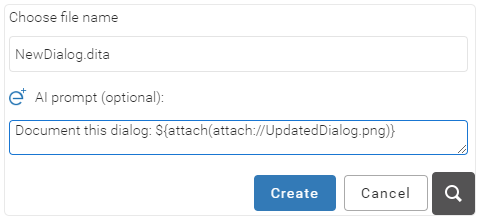
When creating a new file in Web Author, you can now provide instructions in an AI prompt field to generate a document with pre-populated content. You can also use drag and drop or copy/paste to attach text files (XML, Markdown), images, or documents (PDF, Word, PowerPoint), to guide the AI in generating content for your new file.
Uncluttered Chat Input Area
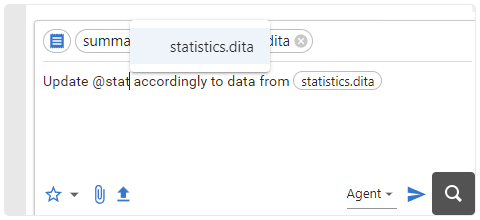
Attachments that you add to your conversation to provide additional context are now presented above the chat input area, ensuring that they do not clutter your instructions. You can still reference specific attachments inline within your instructions by using the @ symbol followed by the file name.
OpenAI GPT-5.1 Models Available
The flagship GPT-5.1 and GPT-5.1 Thinking models are now available in the list of OpenAI models to choose from.
xAI Grok 4 Fast Models Available
The latest fast models for xAI Grok are available to choose from, including Grok 4 Fast and Grok 4 Fast (Non Reasoning).
Claude Sonnet 4.5 Model Available
The Claude Sonnet 4.5 model (listed as their strongest model for building complex agents) is now available in the list of AI models to choose from.
Claude Haiku 4.5 Model Available
The Claude Haiku 4.5 model (listed as their latest small model) is now available in the list of AI models to choose from.
Inspect Chat Context
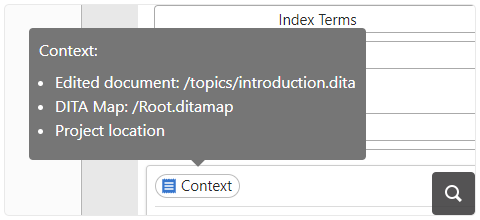
You can see the main context information that is sent to the AI for the current chat by hovering over the Context chip that is displayed above the chat input area. This adds clarity about the information the AI has available when processing a request. That information includes the editor selection (if available), edited document location, the DITA map location, and the project location (applicable for the Web Author integration with Git).
Invoke AI Actions with Keyboard Shortcut
You can quickly invoke AI actions by using the / symbol in an empty chat, then start typing the name of the action. This displays a pop-up menu with a list of available actions that match the text you entered.
Edit Document Tool
When using agentic chat to make changes to topics, small changes (e.g. attribute values, spelling corrections) can be made by the AI engine using the newly available edit_document tool that performs exact string replacements in a specified file.
Easier Access to Tool Call Details
You can now troubleshoot tool calls easier by viewing detailed information about each tool call directly in the Chat view. Simply hover over the tool name to see a summary, or click it to open a dialog box where you can review, copy tool call details, and import or export chats for sharing purposes.
Custom Actions Prioritized
Your custom actions are now displayed before the built-in actions wherever AI actions are shown, so you can access them more quickly.
Improved Tool Names and Descriptions
All the names and descriptions of tools that are available in the chat or AI actions were improved for greater accuracy and relevance. This allows the AI to better decide what tool to call and what parameters to pass, thus improving the agentic AI workflows.

© Copyright 2000-2026 COGITO SOFTWARE CO.,LTD. All rights reserved
