All-In-One Office Suite
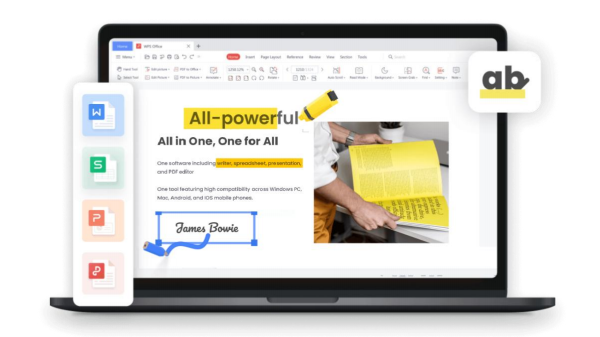
WPS Office is a lightweight, feature-rich, and comprehensive office suite with high compatibility. As a handy and professional office software, WPS Office allows you to edit files in Writer, Powerpoint, Sheets and PDF to improve your work efficiency. Which can also be summarized as Free All-in-One Office Suite with PDF Editor.
Why WPS - Best alternative office tool of Microsoft
WPS Office's advanced feature list

WPS Writer: Create Inspiring Documents with Ease
Supports 15 File Formats: Effortlessly handle common formats like .doc, .docx, and .txt, while preserving content and formatting integrity.

WPS Spreadsheet: Manage Data with Ease
Supports 17 File Formats: Compatible with .xls, .xlsx, .csv, .txt, and more, ensuring data, formulas, charts, and formatting are preserved.

WPS Presentation: Create Stunning Slides with Ease
Supports 20 File Formats: Compatible with .ppt, .pptx, .pps, .pot, and more, preserving animations, charts, and formatting details with precision.

WPS PDF: A Simple and Efficient PDF Editing Tool
WPS PDF offers convenient PDF conversion and editing features, enabling you to convert PDFs to Word, Excel, PowerPoint, JPG, and more. It also supports viewing, editing, annotating,etc.
More Popular features
Table of Contents
The Table of Contents can automatically identify the article chapters and title levels, generating the table of contents in just one second.
Mail Merge
It lets you batch create and edit documents like emails, invitations, pay slips, and more, eliminating repetitive tasks.
Table Tools
You can create tables directly in Writer without opening a new document, using a toolbox for formatting, formulas, sorting, and more.
Merge & Split
WPS Writer allows you to split or merge files with customizable options, simplifying document management.
Eye Protection Mode
Adjusting the screen's color temperature and brightness reduces blue light, minimizes eye strain, and supports optimal vision during work and study
WPS PDF Tool
WPS PDF is a PDF Editor of WPS Office suite (including Writer, Spreadsheet, Presentation, and PDF). Its powerful PDF tools makes it the perfect cost-effective alternative to Adobe Acrobat, iLovepdf, Smallpdf, Foxit, and other PDF editors.
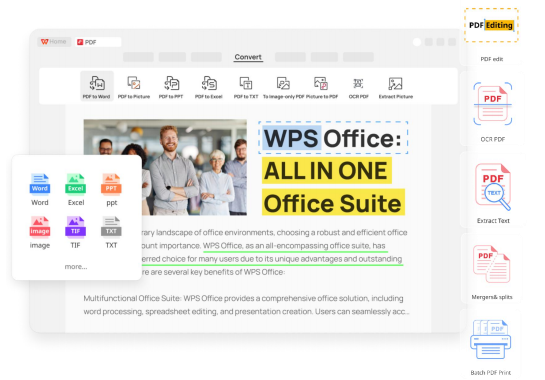
WPS PDF provides a one-stop PDF solution, including converting, editing, and signing PDF files. You can also use our PC software, app or web version to edit, manage, store, and share PDF files across devices.
Key Features for WPS Office PDF Editor
|
Edit PDF |
Edit PDF Like Word You can modify text, insert images, add page numbers, annotate, and sign PDFs, streamlining and simplifying the editing process. |
|
Convert PDF |
Convert to Word, Excel, PowerPoint, Image, etc. Quickly converts PDFs to Word, Excel, and PowerPoint while preserving quality and formatting. Batch conversion simplifies document management. |
|
Sign PDF |
Sign PDFs Effortlessly WPS PDF makes adding signatures simple, supporting both handwritten and digital certificate-based options for enhanced security and authenticity. |
|
OCR PDF |
OCR PDF for Scanned Files WPS PDF OCR features accurately converts scanned documents and images into editable PDFs while preserving the original formatting. |
|
Organize PDF Pages |
Organize PDF Pages With Ease With WPS PDF, you can easily rearrange the PDF pages, delete unwanted PDF pages, split, merge, rotate PDFs. |
|
Compress PDF |
Compress PDFs Quickly Compress PDFs to a smaller file size without losing quality. Support bulk PDF document compression. |
|
Protect PDF |
Protect Your Sensitive Data Lock the entire document with a secure password or permanently redact sensitive information from a document's content. |
|
More Free Features |
For Users, Free Tools are the Best The WPS PDF toolkit offers free features like Merge, Split, Fill, CAD to PDF, PDF to CAD, Repair, and Batch Print for PC users. |
Hardware Requirement
|
Supported OS |
Windows 11/Windows 10/Windows 8.1/Windows 7 |
|
CPU |
Dual-core processor or above is recommended |
|
Memory |
2GB or above is recommended |
|
Disk |
4GB or more available space is recommended |
|
Supported File Formats |
Writer: .wps, .doc, .dot, .mht, .htm, .rtf, .xml, .wpt, .docx, .dotx, .mhtml, .html , .txt, .docm, .dotm Spreadsheet: .et, .xls, .xlsx, .dbf, .prn, .xltx, .xla, .ett, .xlt, .xlsm, .csv, .dif, .xltm, .xlam Presentation: .dps, .ppt, .pot, .pps, .jpg, .tif, .ts, .dpt, .pptx, .potx, .ppsx, .pn g, .bmp, .pptm, .potm, .ppsm PDF: .pdf |
|
Language |
English, Deutsch, Français, Polski, русский, Español, Português, 日本語, Bahasa Indonesia |
|
|
ote: The performance and speed of processing the documents vary based on your computer's processor, memory, and available disk space. Please ensure that it exceeds the system requirements |
|
|
|

© Copyright 2000-2026 COGITO SOFTWARE CO.,LTD. All rights reserved
