What subscription plans are available?
We offer various subscription plans to meet everyone's needs, including Free, Indie, Pro, Teams (for more than 2 seats), and Educational (exclusive for teachers, professors, and institutions).
I only see subscription options. Does Cascadeur offer a perpetual license, too?
Every Yearly Pro and Yearly Indie license is automatically converted into a perpetual license after the minimum term of one year.
This means that even if you cancel your subscription after the first year, you can continue to use the last version released during your subscription period - to the full extent and without time restrictions. Still, it's worth keeping your subscription. An active subscription to Pro and Indie plans is a prerequisite for receiving further version updates and personal customer support from our staff.
What plan is more suitable for me?
Free - for those who get to know Cascadeur. No time limits apply!
Indie - for indie developers and enthusiasts. Get it if you just need the ability to export your animations to other software.
Pro - for those who want to use all of the features Cascadeur has to offer.
Teams - for studios and companies that need many licenses. Includes access to seat management through the admin Cascadeur account.
Educational - for schools, colleges and universities.
What are the differences between Pro and Teams plans?
Pro and Teams plans offer the same full functionality in the Cascadeur software. The difference lies in external features, such as:
- Yearly Pro plan includes a Perpetual license. Yearly Teams doesn’t include one.
- The Teams plan includes seat management tools. The Pro plan doesn’t include such tools.
What are the differences between an annual subscription and a monthly subscription?
We offer two subscription types with different terms and benefits:
The subscription with monthly payment (Monthly) can be canceled on a monthly basis and is therefore very flexible. However, with the monthly subscription you do not benefit from the conversion into a perpetual license, as with the annual subscription. You pay the license fee monthly in advance.
The annual subscription (Yearly) offers a better price line ratio and the exclusive advantage that your subscription converts into a Perpetual License of Cascadeur after the minimum term of 12 months. With the annual subscription, you pay the license fee 12 months in advance.
Can I export animations in all formats with any subscription?
Animation export options vary by subscription:
- Free: Only proprietary CASC format.
- Indie, Pro, Teams, and Educational: All available formats.
Are there any restrictions on commercial use?
- Free and Educational plans don’t allow any commercial use.
- Indie plan has a restricted commercial use, where a licensee’s (you or the company you’re a part of) aggregate gross revenue or funding (from any source of financing) must be less than $100,000 per year.
- Pro and Teams plans allow for full commercial use.
Are there any onboarding services offered?
Yes, a 30-minute onboarding call is provided for teams with more than 4 seats.
Is dedicated support available for all subscription plans?
Dedicated chat in Discord and priority queue customer service are available for Teams subscriptions and higher. Pro subscribers also have access to the dedicated chat in our Discord channel with priority support.
In which languages is Cascadeur available?
Cascadeur software, its documentation, and legal documents, such as the EULA, are currently offered and maintained in English only. Machine translation in Korean, Japanese, and Chinese is available for documentation.
What are the system requirements for Cascadeur?
Cascadeur for Windows is supported on Windows 10 (version 1809 or later) and 11. Windows 7 and Windows 8/8.1 were supported up until and including version 2022.3.
Cascadeur for Linux is supported on devices with Ubuntu 20.04 or later installed. Other distributives (Arch, Debian, Wayland, etc) are not supported.
Cascadeur for Mac is supported on ARM Macs (with Apple M1, M2, and other processors), with macOS 13.3 or later installed. x86 Macs (with Intel processors) are not supported.
Minimum Hardware Requirements:
If you have an older PC and are not sure whether your CPU supports SSE4.1, please use a search engine. (Recommended search term: “Name of your CPU” combined with "SSE 4.1").
How many computers can I install the software on with a single seat?
You can install Cascadeur software and use the seat/license purchased on your Cascadeur account on up to 3 desktop devices. Please note that only you can use the license purchased on your Cascadeur account.
What is Paddle? What does it offer me as a consumer and a Cascadeur user?
Paddle is a Merchant of Record service that allows users worldwide to purchase digital products from businesses.
Paddle can offer you:
- Customer portal for tracking transactions and managing subscriptions
- Invoice generator
- Streamlined process for upgrading your Cascadeur licenses
I previously used Xsolla to buy my Cascadeur licenses. Will I have to use Paddle now?
Cascadeur users who have previously purchased their licenses through Xsolla will continue to use Xsolla’s Pay Station to renew their active license. Those who purchase a new license will be redirected to Paddle’s payment page.
At the moment, there is no straightforward way to get transferred from Xsolla to Paddle, but we’re actively looking for solutions.
I don’t want to use Paddle. Can I continue using Xsolla to buy/renew my Cascadeur license?
As long as you continue renewing your existing subscription, you will be able to renew with Xsolla. Any new license purchases will be done through Paddle.
I click the “Get license” button, and seemingly nothing happens. What’s wrong?
Please check that the connection to paddle.com isn’t being blocked by anything on your computer, such as a NoScript add-on, Adblock, antivirus or your firewall settings.
Can I buy a license with a discount?
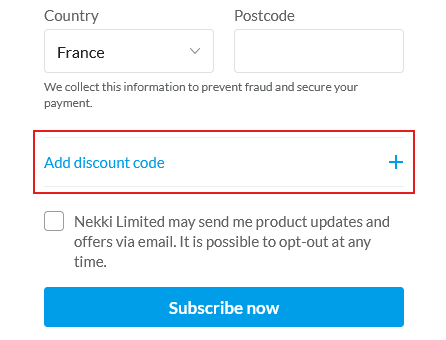
If you have a discount code, you can use it during checkout. Press the “Add discount” button, put the discount code into the appeared input field, then apply.
When I attempt to purchase a Cascadeur license through Paddle, it adds additional taxes to my final price. Is that supposed to happen?
Yes, depending on your country of residence, Paddle may increase your final price with the added taxes.
If you’re an EU business, you can buy a license as a business by including your VAT and business information.
I would like to upgrade my Cascadeur license. How can I do that?
In your Cascadeur profile, in the “Subscriptions and Billings” section, there’s a dedicated “Update Subscription” button. In the appeared menu, you can upgrade your license’s subscription period and license type.
What happens if I upgrade to license that’s cheaper than my current license (e.g., from Yearly Indie to Monthly Pro)?
Your leftover balance from the latest purchase will go towards buying the new upgraded license. If there are any additional funds left after that, they’re “stored” by Paddle as credits to be used for the next license renewal.
Can I “downgrade” my subscription period and license type (e.g., from Yearly Pro to Monthly Indie)?
You can downgrade your subscription period, but not the license type. The license type can only be upgraded from Indie to Pro to Teams.
How can I check the renewal date and renewal price?
In your Cascadeur profile, check the “Subscriptions and Billings” section. The renewal date is also shown in Paddle’s customer portal.
Can I cancel my active subscription?
If you have an active subscription that you've been renewing from before September 1st, 2025:
In your Cascadeur profile, check the “Subscriptions and Billings” section. Click the "Unsubscribe" button.
If you have an active subscription that you've started after September 1st, 2025:
In your Cascadeur profile, check the “Subscriptions and Billings” section. There, click the “Manage subscription” button or enter the customer portal on the same page. On the appeared page, click the “Cancel subscription” button at the top.
I’ve cancelled my subscription renewal, but then changed my mind. Can I activate it again?
In your Cascadeur profile, check the “Subscriptions and Billings” section. There, click the “Manage subscription” button or enter the customer portal on the same page.
How can I manage my existing Cascadeur licenses, upgrade, or purchase more?
In your Cascadeur profile, enter the “Subscriptions and Billings” section and click the “Update subscription” button. In the appeared menu, you can:
- Change the subscription term (Monthly to Yearly and vice versa)
- Upgrade the license type (Indie -> Pro -> Teams)
- Buy additional licenses (Teams only)
I bought multiple Teams licenses. How can I distribute them to other people?
In your Cascadeur profile, find the “Administration” section. There, you can assign the purchased Teams licenses to other Cascadeur accounts.
I would like to get an invoice for the purchased licenses. How can I get one?
In your Cascadeur profile, go to the “Subscriptions and Billings” section. Click the “Manage subscription” button or enter Paddle’s customer portal.
On the webpage that appears, find the “Payments” section and select the transaction for which you want an invoice. Click the “View Invoice” button in the top right corner - you’ll be redirected to a separate webpage with the generated invoice.
To save the generated invoice, either click the “Save” button in the top right corner (second from the right) or right-click on the invoice page and select “Save as…”
What are the paid features in Cascadeur Mobile?
The paid features unlocked with the Pro (desktop or mobile) license include:
- Animation, object and scene export in FBX, GLB and CASC formats (FBX file support not supported on Android)
- Video reference
- Removal of watermark on video export
- Tween machine tool
What are the rules of discounts and promo codes?
Promo Code Terms & Conditions
Welcome to our special promotions page! Here are the details on how to use promo codes to get exclusive discounts on your Cascadeur subscription.
Note that the promo discount may already be applied if we’re running a promo campaign (New Year’s, etc) - you can check it in the payment summary.
Thank you for being part of our community! We’re thrilled to help you bring your animations to life with Cascadeur.
How to Get a Student or Teacher License?
There are two ways to verify your educational status, depending on whether your university domain is already in our system:
- If your university domain is recognized
- If your university domain is not recognized

© Copyright 2000-2026 COGITO SOFTWARE CO.,LTD. All rights reserved
