Installing
How many WinLock copies do I have to purchase?
WinLock is licensing on a per-computer basis. One license is required for each computer where software is installed. In case of diskless clients, one license per node is required.
Do I need to install WinLock on every system?
Yes you do.
During registration, I get "Invalid name or product key" error.
Please make sure you have the appropriate WinLock edition: Standard (blue lock icon) or Professional (red lock one).
I still get a trial reminder when other users are logging on.
Use Run as administrator command to run WinLock under any account. Then, enter your license info. This will fix the issue.
How do I deploy WinLock?
WinLock should be installed on each computer that you want to restrict and control. WinLock supports unattended (silent) setups. This provides an installation method that can be used from within a batch file:
Then, start WinLock and use command-line parameters to apply security profiles:
Can I access WinLock remotely?
Yes, you can access WinLock via network using WinLock Remote Administrator.
Troubleshooting
All settings are reset after restart.
Use Run as administrator command to run WinLock once. This will fix the issue.
Some security options are not working after restart.
Before using WinLock, you need to configure system access permissions. To do this under General → Protection click Fix button to adjust the access permissions automatically. User Account Control should be turned on. If you are using Windows XP, administrator's password should not be blank. If you don't see the Fix button, there is no need to configure the account.
When WinLock is enabled, the desktop icons are flickering.
This may happens when some other software overrides the security settings that are monitored by WinLock. To suppress the flickering, turn System monitoring option off.
I forgot my WinLock password.
To recover your password, right-click WinLock tray icon and enter your license key in the password prompt. Be sure to enter the key EXACTLY as it appears in the message that you have received from us after you have purchased your license. If you have entered your license key correctly, the Password recovery will send an e-mail with a password recovery data. We will recover your password and send it back to you.
The tray icon is hidden and I can't access WinLock settings.
If you disabled WinLock tray icon and can't remember your hot key, try to do the following:
When enabled, Chrome browser won't launch after close.
This issue is related to old Chrome browser versions: if Disable Command Prompt option is enabled, Chrome will not open after close. To fix, open Registry Editor and simply rename or delete this key:
HKEY_LOCAL_MACHINE \ SOFTWARE \ WOW6432Node \ Google
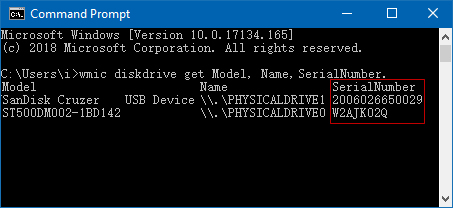
Why my device cannot be used as USB key?
Make sure that your USB device is removable and has a correct serial number:
Tips and Features
How do I disable the ability to rename files?
How do I block Web browser?
Can I use wildcards to restrict access to websites?
Open WinLock and select Internet → Restricted Sites.
You can use * and ? wildcards to restrict access to a questionable content. A question mark matches any single character. An asterisk matches any number of occurrences of that string followed by any characters.
For example: *se* will block all words contained se (set, reset, secret, etc.), *s?t* will block both set and sat, but not secret. *s*t* will block set, sat, and secret.
How do I protect desktop icons?
Does WinLock support kiosk mode?
Kiosk mode allows the use of the one specific application, while disabling access to other programs and system resources. To enable kiosk mode:
How to disable Ctrl+Alt+Del?
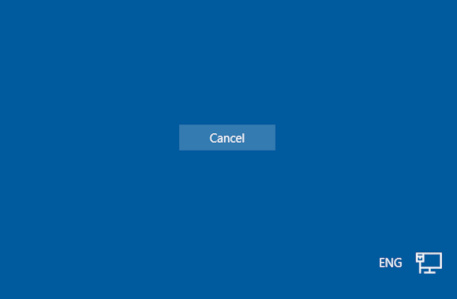
You can disable all buttons on Windows Security screen. This will make Ctrl+Alt+Del useless:
How do I disable the Task Manager?
How to disable Start button, taskbar, or pinned apps?
Under System, select Start menu and Taskbar and enable the appropriate options.
How to remove Cortana, Task View, and People from the taskbar?

© Copyright 2000-2026 COGITO SOFTWARE CO.,LTD. All rights reserved
