|
|
|
|
|
|
|
Recover Outlook mailbox data, including inbox, contacts, journals, tasks, deleted items, outbox, and notes. The Outlook File Recovery software restores mailbox data into Office 365, Exchange Server, Outlook.com, Gmail, and other supported webmail clients or Cloud servers.
Free download Kernel Outlook Recovery software and save the first 25 items from each folder.

190+ COUNTRIES WORLDWIDE
20 YEARS' EXPERIENCE
24x7 CUSTOMER SUPPORT
Outlook Email Recovery Tool: What Data We Recover
Explore all the data types that our feature-rich Microsoft Outlook Recovery tool can easily recover:
Contacts
Calendar Entries
Core Details
Additional Metadata
Tasks
Additional Metadata
Notes
Core Note Data
Metadata & Features
Journal
Core Journal Data
Metadata & Features
User-created Folders
Folder Structure & Metadata
Folder Properties
Outlook Mail Recovery Software – Key Capabilities
The Microsoft Outlook recovery tool is equipped with adequate features and capabilities to perform Outlook mail recovery with higher efficiency.
Complete Outlook File Recovery
Download PST recovery tool to securely recover Outlook PST files, including emails, contacts, calendars, tasks, notes, and attachments, even from corrupted or inaccessible files. Restore all data effortlessly with complete folder structure and formatting intact.
Bulk Outlook Data Recovery
The Outlook Email Recovery tool effortlessly recovers single or multiple Outlook PST files at once. Equipped with a highly advanced algorithm to manage bulk PST file recovery without any loss and downtime.
Outlook Deleted Email Recovery
Restore accidentally deleted or permanently erased emails, including attachments, with ease. Our Outlook PST Recovery software highlights deleted items in red for quick identification, eliminating confusion about existing or deleted emails.
Save Recovered Data in Various Formats
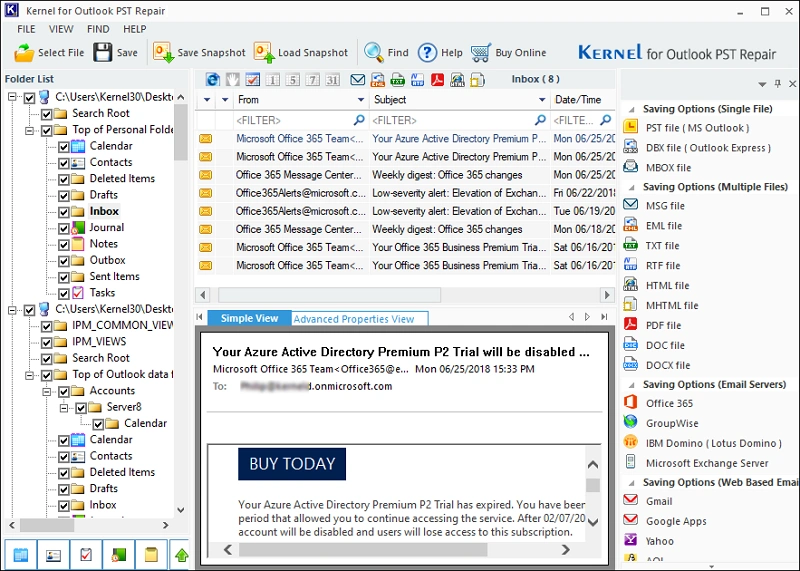
Recover Outlook file and save it in versatile file formats, such as PST, MSG, EML, PDF, HTML, MBOX, and and DOCX. Additionally, the PST recovery tool allows you to export all emails, contacts, and calendars in any specific format accordingly.
Save Outlook Data in Email Servers
Easily migrate Outlook PST files to email servers like Office 365, Exchange Server, IBM Notes (Lotus Domino), and GroupWise. Access all the emails, contacts, and calendars in any email server.
Export Outlook Files to Web-based Email Clients
Export Outlook PST files to webmail platforms, like Yahoo Mail, Gmail, Google Apps, AOL, Hotmail.com/Live.com/Outlook.com, iCloud, and Company IMAP Account. Centralize all Outlook data to any email client with ease.
Preview Outlook Data Files
Our Outlook Mail Recovery software has an advanced preview function that displays emails, attachments, and metadata in their original format before recovery. Easily verify content and selectively restore PST data accordingly.
Super Snapshot Feature
Speed up PST file recovery with our Super Snapshot feature. Save snapshots of large/multiple PST files to skip re-uploading data file later. Simply, reload saved snapshot anytime for instant access and hassle-free Outlook Mail Recovery.
Quick Search Feature
Find emails, contacts, or files instantly with our Quick Search feature. Filter out searches by From/To/Subject fields or use date ranges to find necessary data. Achieve quick results in just a few seconds with 100% efficiency.
Smart Filters for Precise Data Recovery
Free download PST recovery tool to recover only the required Outlook data with smart filters. Get precise and selective PST file recovery based on different filters, including data according to From, To, Subject, Folder Name, Item Type, or Date Range.
Split Large-size Outlook PST File
Easily manage large PST files by splitting them into smaller, organized PST files with our advanced Outlook PST Recovery tool. Split oversized Outlook data into multiple PSTs of different sizes for better performance without losing any data.
Exclude Outlook Deleted Emails
Simplify the Outlook mail recovery process by choosing to exclude deleted emails entirely. This feature of the PST recovery tool permits you to recover only existing data from Outlook files to save time and storage space.
Save Backed-up Outlook Data Locally
Save recovered Outlook data on various locations, such as local drive, network storage, or external hard drives. The Outlook PST Recovery tool automatically detects all connected devices and saves data across multiple locations.
Generate Detailed Graphical Reports
Generate easy-to-understand graphical reports based on Total item types, Mail flow density by dates, Mail flow density by senders, and Interaction between users. Analyze communication patterns and PST recovery results in the software.
Free Microsoft Outlook Recovery Tool
Try free trial version of the Outlook PST Recovery utility to recover 25 items per folder without any cost. Experience the powerful recovery features before upgrading to licensed version. For complete Outlook PST file recovery, upgrade your license at an affordable price.
How to Perform Microsoft Outlook Recovery?
The Microsoft Outlook recovery tool deeply scans and recovers corrupt Outlook data files with the following steps:
Step 1: Download and install Kernel Outlook Recovery software.
Step 2: Launch the software, click "Browse" to add single/multiple Outlook data files, and click "Next."
Step 3: Select specific files and view the entire data of the mail in the Preview pane.
Step 4: Select all the folders or the selected folders from the left pane, and then click "Save."
Step 5: Apply filters and output preferences as needed.
Step 6: The software will recover and save the output file in your desired location.
Save Recovered Outlook Data to Various Formats
File Formats:
Save Outlook emails to multiple file formats, such as:
Email Servers:
Migrate entire Outlook emails data to several email clients, such as:
Web-Based Email Clients:
Transfer all the Outlook data files to various email clients, including:
Kernel Outlook Recovery Tool - Major Benefits
Fix Severe Corruption from Outlook Files
Don’t stress over severely corrupted Outlook PST files. Our Outlook Mail Recovery tool expertly recovers Sent, Trash, Archive, Spam & Draft data from even the highly corrupted or inaccessible Outlook files.
Recover Encrypted Outlook File – On Demand
At the request of users, our PST recovery tool decrypts and recovers password-protected Outlook data. Effortlessly access all emails, contacts, and calendars while keeping your information secure.
Support Large-sized PST Files
Our advanced Outlook email recovery tool effortlessly handles oversized PST files without any size limitations. Recover every email, contact, and calendar item from large-sized Outlook files without any crashes.
ANSI and UNICODE Characters Recovery
Recover every character perfectly, whether ANSI or UNICODE, with original formatting intact. This Outlook data Recovery utility preserves all languages, symbols, and numerical data exactly as they appeared in the source file.
Frequently Asked Questions - Outlook Recovery Software
What data items can the tool recover?
The PST recovery tool allows you to recover every data item of Outlook, including emails (with attachments), contacts, calendar events, tasks, notes, etc. All the data will be recovered with the original key attributes and metadata.
Can the software recover multiple Outlook data files?
Yes, our Outlook PST Recovery tool can easily recover Outlook PST files, irrespective of file count and size. It’s built with powerful algorithms that are designed to handle bulk Outlook mail recovery without hassle.
I only want to recover specific data. Will this Outlook recovery wizard allow it?
Yes. The Microsoft Outlook recovery tool is embedded with several filters like From, To, Subject, Folder Name, Date Filter, and Item Type for performing user-selective data recovery. The software also allows you to view complete Outlook file before recovery. You can view, select, and recover PST file data item that you want to save.
Is there a free trial for the recovery tool for Outlook?
Yes. There is a demo version available for free download. The free version of Outlook Recovery Software allows you to recover up to 25 items per folder.
I have multiple folders in my Outlook data file. Can I recover data with all the folders?
The Outlook email recovery tool thoroughly scans every file & folder of the Outlook file and recovers complete data in the original format. All your data will be restored as it was, with the same integrity and original folder structure.
I have Outlook 2003. Does tool software support it?
Yes. Our Outlook email recovery tool supports every version of Outlook, including Outlook 2003.
Kernel Outlook Recovery Software
Prerequisites & Recommendations
About Software
Version: 26.0
Release Date: April 2020
Version Release Date: Dec 2025
License Type: Home, Corporate & Technician
Version Support
MS Outlook: Office 365 Outlook, 2024, 2021, 2019, 2016, 2013, 2010, 2007, 2003, 2002, 2000, 98 and 97
System Requirements
Hard Disk: 500 MB of disk space
Memory: 1 GB Minimum
Processor: Intel® Pentium Processor compatible (x86, x64) or equivalent
Operating System: Windows 365, 11, 10, 8.1, and older versions Windows Server 2022, 2019, 2016, 2012, 2008 R2, 2008, 2003 R2, 2003 OS

© Copyright 2000-2025 COGITO SOFTWARE CO.,LTD. All rights reserved










