|
|
|
|
|
|
|
Exchange Server Backup tool for secure Exchange backup
1M+ Downloads
Backup Exchange mailboxes, multiple archive mailboxes, shared mailboxes, and saved public folders into PST format with this software. The Exchange backup software takes backup from on-premises Exchange/Hosted/Exchange Online to local PC in various formats, including Outlook PST, MSG, EML, PDF, DOCX, HTML, etc.
190+COUNTRIES WORLDWIDE
20YEARS' EXPERIENCE
24x7CUSTOMER SUPPORT
What's new inKernel Exchange Backup & Restore v24.2
Top use cases for Kernel Exchange Backup and Restore
Explore the top use cases section to get a detailed analysis of the advanced capabilities of our Kernel Exchange Backup and Restore tool.
Export all mailbox data to PST with complete integrity
When tasked with exporting all mailbox data to PST, trust our Kernel Exchange Backup & Restore tool. With a straightforward process encompassing source selection, filter application, destination choice, and execution, this Exchange server backup and restore software guarantees complete data integrity throughout the export procedure. Moreover, it goes a step further and enables to backup Exchange server mailboxes in individual PST files, providing a hassle-free solution for managing diverse mailbox data.
Secure backup of Exchange Public Folder data to PST
When it comes to securing your Exchange public folder data, rely on our Kernel Exchange Backup & Restore tool. It backs up entire data, including messages, calendar items, journal entries, contacts, and more, into PST. Whether dealing with legacy or modern public folders, residing in a mailbox or public folder database, the Exchange database backup tool ensures a hassle-free backup process. Safeguard your critical public folder data effortlessly with this reliable Exchange backup software.
Support backup of Archive mailboxes to PST
Ensure the security of your Exchange archive mailboxes using our Kernel Exchange Backup & Restore tool. The software not only backs up primary user mailboxes but also supports archive mailbox backup. With archiving activated for user mailboxes, the tool intuitively presents archive mailboxes within its console, simplifying the selection process during backup. With administrative privileges, you can backup archive mailboxes for multiple users, providing a comprehensive approach to data protection.
How to take backup of Exchange mailbox?
The software allows you to efficiently backup and restore Exchange Server files without losing any data. Use the below described 3 steps process to complete backup and restore.
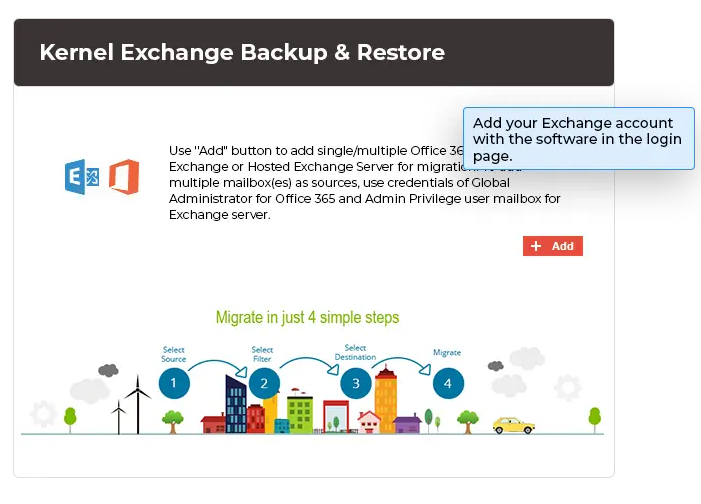
Add Exchange server account:
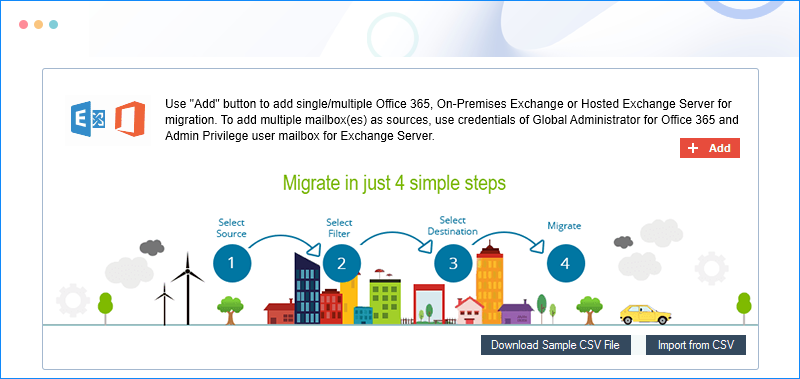
First, add your Exchange account with the software in the login page. Use your Exchange credentials.
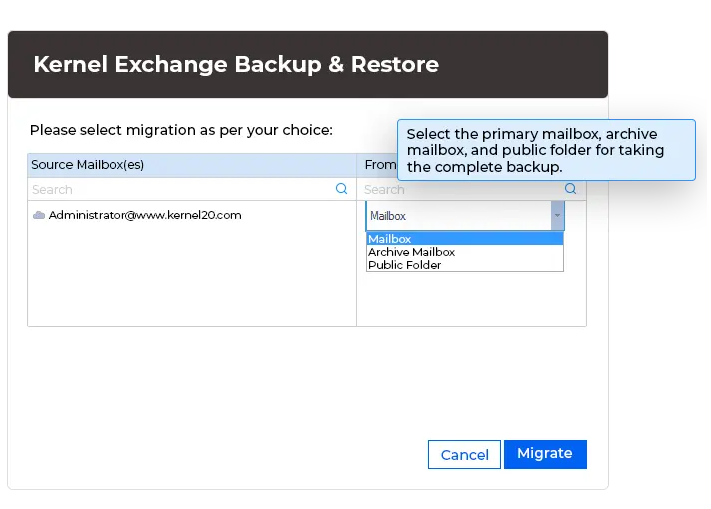
Select mailbox:
Select the primary mailbox, archive mailbox, and public folder for taking the complete backup.
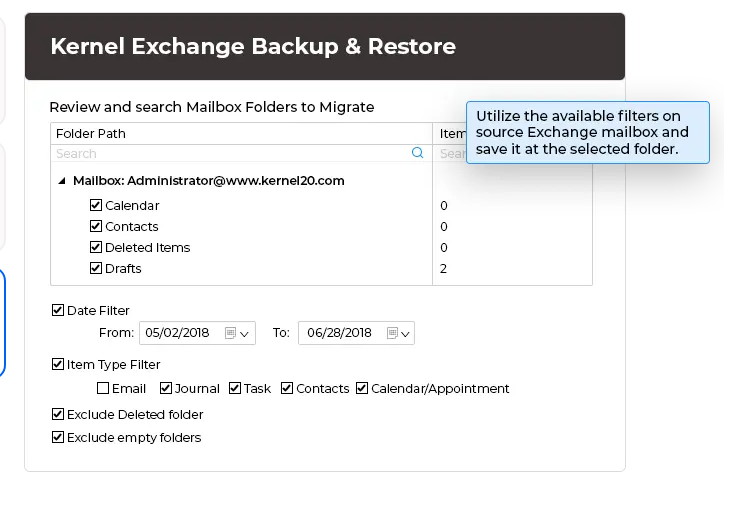
Apply filter and backup:
Utilize the available filters on source Exchange mailbox and save it at the selected folder.
Kernel Exchange Backup & Restore software’s key capabilities
The most exclusive features integrated into the Exchange Backup & Restore tool are described here.
Backup multiple Exchange mailboxes to PST
Brick-level backup is easy for Exchange administrators now. Use this software to backup Exchange data and multiple mailboxes at a time, and each mailbox is saved to a separate PST file at the specified location.
Backup multiple Archive mailboxes to PST
Backup multiple Archive mailboxes of Exchange Server with Kernel Exchange Backup and restore software. When archiving is enabled for a user mailbox, software displays the archive so that users can select it for backup.
Backup Shared mailboxes to PST
Utilize this software to backup and save shared mailboxes (accessible to multiple users with different permissions) and save them to PST format. To take a backup of shared mailboxes, Exchange account must be associated with a shared mailbox.
Save Public Folder data to PST
Save public folder data of Exchange Server directly to PST with Kernel Exchange Backup & Restore tool. Also, perform backup for Exchange mailbox including messages, Calendar items, Journal entries, Contacts, etc., and modern public folders.
Restores healthy PST files to Exchange
Import (restore) a PST file back to Exchange with our tool. Just browse for the PST files, provide the Exchange credentials, filter the data, and migrate. The filters are the same for both the backup and restore processes.
Restore user mailboxes from Exchange OST files
The tool also provides the facility to restore offline storage (OST) files to Exchange. So, if you have some missing, deleted, or disconnected mailboxes, you can restore them from the OST files on the user systems.
Use CSV file to add multiple mailboxes
Use CSV files for backup of many mailboxes according to your convenience. Download a sample CSV file from the backup for Exchange software, input the source & destination details, and then import it to the tool.
Filters to backup only the desired data
Select advanced filters of the tool to back up the data. Users can include or exclude the mailbox folders (Inbox, Outbox, Sent Items, etc.), select item types (Email, Journal, Task, etc.), and filter the mailbox items by date range.
Skip Deleted Items folder & empty folders
The tool facilitates different unique features where users can skip the Deleted Items folder and empty folders from the backup. It’s convenient when users have a large number of empty folders in their mailboxes.
Run multiple instances of tool simultaneously
While performing backup for Exchange server, users forget to backup some Exchange data. In this scenario, this tool allows users to run multiple instances to backup and restore the left Exchange Server data without interrupting previous process.
Incremental backup
Using the Incremental backup feature of the tool helps you save time, effort, and storage space. With this feature, you can skip the previously backed-up data from the backup or import process.
Reports in a CSV file
Get the entire backup and restore report in a CSV file with this Exchange server backup and restore software. Reports will view the entire data, including mailboxes, backup destination, and status of backup/restore, to give a seamless presentation of Exchange Server.
Kernel Exchange Backup & Restore FAQs
Find answers to common questions about using our Exchange Backup and Restore tool to ensure smooth backup and email recovery.
How does Kernel Exchange Backup & Restore software help to backup Exchange Server securely?
The Exchange database backup software protects the mailbox data during the connection as it copies the data without any entrance inside the Server. It asks for account’s credentials (Exchange server name or IP address, email address, and password) and lists the mailboxes for backup. The following are the steps to run the process.
Step 1: In the home screen of the software, click Backup.
Step 2: Click on Add button to login to the Exchange account.
Step 3: Use your account's credentials like Exchange Server name/IP address, mailbox login ID, and Password. Make the selection for either single or multiple mailboxes.
Step 4: After verifying the legalities of your account, the software will connect with mailboxes.
Step 5: Choose if you want to save Mailbox, Archive Mailbox, and Public Folder.
Step 6: Apply various kinds of filters on the Exchange data to select the necessary part of mailboxes to backup Exchange Server only.
Step 7: Select the folder location where you want to save the backup file.
Step 8: After saving the mailbox data in PST format, the successful message will appear showing the status. Kernel Exchange Backup tool will save the PST file in the selected folder. Click OK.
Step 9: Save the report in CSV format, then click OK.
CSV files are used to store tabular data. How does this tool use the CSV file?
Yes, the CSV files are used to store tabular data, and our tool uses it for the automated backup of multiple mailboxes. It provides a pre-designed CSV file for you. Here are the steps for using a CSV file for multiple mailbox backups.
Step 1: Download the sample CSV file from the software.
Step 2: Fill all the columns of CSV file by inputting the details of source and destination.
Step 3: Import the same CSV file back to the software and continue with the backup process.
What is meant by Modern Authentication in the tool?
For Office 365 login, the tool provides a Modern Authentication option in addition to Basic Authentication. It helps you add the Office 365 account easily and effortlessly using Tenant ID, Client ID, & Client Secret.
What prerequisite should I have before using this tool for Exchange backup or restore?
Please, note the following points:
I have a large number of mailboxes in my database. Will this tool create a single PST file for all mailboxes?
The tool creates a separate PST file for each Exchange mailbox. Moreover, you can also restore Exchange server from backup you’ve taken previously.
Can this software stop backing up empty folders from Exchange Mailbox?
Yes. There is an option on the filter page of the tool to skip all the empty folders from the backup.
Does the software need an active Outlook application to save the PST file?
No, you do not need to have an active Outlook application to create the PST file while taking the backup. But, if you want to use the PST file, then you should have the Outlook for it.
Will I need to have Exchange credentials to use the PST file?
No, you do not need to have your Exchange credentials to access the PST file.
Does this software help to restore Exchange server from backup?
Of course, this Kernel Exchange Backup & Restore software not only backup Exchange data, but it also specializes to restore Exchange server from backup effectively.
Kernel Exchange Backup & Restore
Prerequisites & recommendations
About Software
Version: 24.2
Release Date: July 2024
License Type: Technician
Version Support
MS Exchange: 2019, 2016, 2013, 2010, 2007, 2003, 2000, 5.5 and 5.0
MS Outlook: Office 365, 2021, 2019, 2016, 2013, 2010, 2007, 2003, 2002, 2000, 98 and 97
System Requirements
Hard Disk: 100 MB of disk space
Memory: 2 GB RAM
Processor: Intel® Pentium Processor compatible (x86, x64) or equivalent
Operating System: Windows 365, 11, 10, 8.1, 8, 7, Vista, XP, 2000, 98, NT and 95 Windows Server 2022, 2019, 2016, 2012, 2008 R2, 2008, 2003 R2, 2003.
What customers say about Kernel Exchange Backup & Restore
(4.9/5) 541 Reviews
This tool ensures our Exchange data is always secure.
Streamlining Exchange Server backups like never before, this tool makes our tasks straightforward and efficient. Highly recommended for hassle-free data management!
Helena Nelson

© Copyright 2000-2026 COGITO SOFTWARE CO.,LTD. All rights reserved










