|
|
|
|
|
|
|
Backup and restore your valuable Google Workspace data, including Gmail, Contacts, Calendar, Drive, and Groups, with the advanced Google Workspace Backup Tool. This G Suite Backup software ensures secure data protection, easy recovery, and reliable full-version performance.
190+COUNTRIES WORLDWIDE
20YEARS' EXPERIENCE
24x7CUSTOMER SUPPORT
Why do we need to backup Google Workspace emails?
Google Workspace provides a retention period to recover data from deleted files. However, their inbuilt tools cannot restore Google Workspace accidentally or permanently deleted data. Google Workspace backup files are essential to prevent user's data from:
Accidental deletion or overwriting
When multiple users work on a project simultaneously, the chances of overwriting and accidental deletion increase. Sometimes, the original file gets deleted mistakenly, or someone overwrites the crucial data. In such a scenario, backup Google Workspace emails and prevent data from accidental deletion or overwriting.
Cyber, malware, or ransomware attacks
Many business organizations often lose their important Google Workspace mailbox data due to cyber-attacks, malware, or ransomware attacks. To safeguard organizations' data from ransomware attacks and encrypting the data, needs lots of money. Instead of consuming money, take a backup at a safe location.
Unauthorized access or internal threats
If an unauthorized user accesses the Google Workspace admin account or any employee leaks internal information, this will compromise data confidentiality. Additionally, the organization may lose control of the Google Workspace account. Thus, a backup is needed to recover data from Google Workspace.
SaaS outages and technical issues
Technical issues or SaaS outages hamper the workflow due to a lack of accessibility. Moreover, an outage can cause some severe issues, such as a chance of data loss when regaining the connection. At this time, only the G Suite backup and restore tool can protect the important Google Mail data.
Creating backup or data loss during migration
When performing the data migration for a merger or acquisition of a business organization, the risk of data loss increases by 2X because of source and destination permissions. Creating a backup of old data is necessary for every organization to avoid data loss and fulfill legal compliances.
Employee leaving the organization
When an employee leaves the organization, the respective user account needs to migrate their data into a safer place and perform deletion. However, before migration and deletion of the account, all the crucial data from Google Workspace must be backed up to the local or network drive of the system.
Why Choose Our G Suite Backup Tool
Google Workspace limits recovery options, and hence, once the data is permanently deleted, it’s gone. This is why it is always a wise choice to rely on third-party Google Workspace backup tool to protect the data. Kernel G Suite backup tool provides the following benefits:
Meet Compliance Requirements
Increase the organization's data retention capabilities to meet legal and industrial compliance standards and allow users to store data for selected periods depending on industry regulations.
Zero downtime backup
Taking more time can increase your worries and money for your business data. Our first priority is providing zero downtime where users can backup their confidential data in the meantime without any hassle.
Security Features
We provide 100 % accurate results without single data loss. Connect your Workspace account securely by using superlative credentials, such as Account Login Email ID, Service Account Email, and P12 path.
Cost-effective for small businesses
Many small businesses cannot afford expensive products for their businesses. But we offer Google Workspace backup tool at affordable prices to fulfill their business requirements.
Key Features of Kernel Google Workspace Backup and Restore Software
Explore all the major capabilities of the software to meet your backup and restore needs with ease:
Backup Google Workspace data
Backup entire Google Workspace mailbox data and its associated apps, including Google Mail, contacts, calendars, Google Drive files/folders, and Appointments with ease.
Backup multiple accounts using CSV
Backup multiple mailboxes using advanced CSV Authentication feature. Export a sample CSV file, enter all mailbox credentials in a manner, and import that CSV in the tool for a hassle-free backup process.
Save G Suite backup in different formats
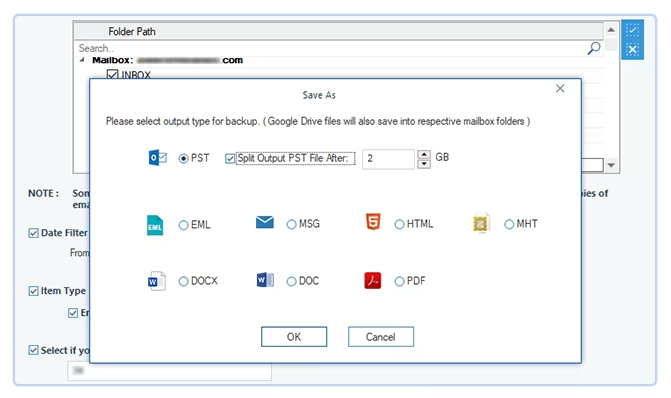
The Google Workspace backup tool allows users to save Google Workspace emails as PST files. As well as backup G Suite data in other various formats, such as PDF, EML, DOC, DOCX, HTML, MHTML, MSG, etc.
Split large mailboxes
Split large-sized Google Workspace mailboxes into multiple smaller PST files, such as 1 GB, 2 GB, 3 GB, and many more. This utility allows users to manage their Google Workspace mailboxes into smaller ones to define sizes and make them more manageable.
Incremental data backup and restore
Utilize the Skip Previously Migrated Email (Incremental) option to save additional new data in the destination. Supports migration of recently added data items only and skips already migrated items.
Backup Google Groups
Extract and save the Google Groups entire data with its users, permissions, settings, metadata, and more in the original hierarchy. Admins can use the Kernel Google Workspace Restore and Backup software to backup multiple Google Groups in PST and other formats.
Backup Google Sheets to local/NAS storage
Export Google Sheets to local drive or network attached storage maintaining the cell formatting, formulas, & structure. Backup spreadsheets from G Suite user to Office supported spreadsheet formats to a separate folder within the selected Google Workspace user.
Backup Google Docs to a local or NAS drive
Select users from the added G Suite account to backup Google docs to local or NAS drive for easy offline access. Effortlessly export all Google Docs files to Office and open Office supported documents, preserving content, original formatting, and data integrity.
Backup Google Chats to PDF or HTML
Backup Google Chats from G Suite users to local or NAS storage. Save direct chats (1:1 chats & groups), and spaces with chat history, messages, etc., in PDF or HTML file formats. Additionally, the tool backup Chat attachments in separate folders within each user's folder.
Advanced filters for selective backup
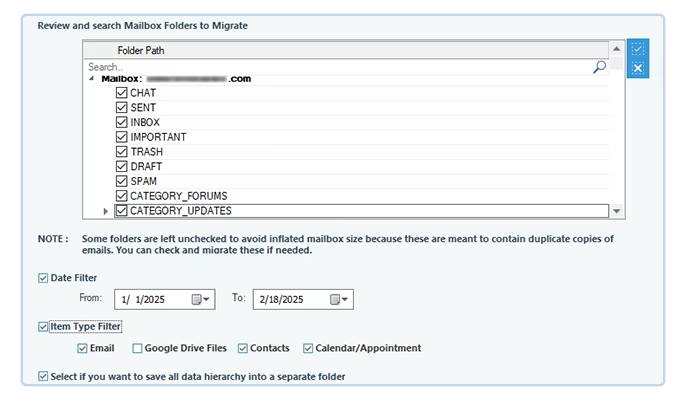
With the Filter feature, backup selective data from a large-sized mailbox with ease. Choose from various filter options, such as date range, data types, and skip previously migrated emails for email backup.
Securely login using P12 key
With Kernel G Suite backup, simplify the login process by creating Public P12 key of your Google Workspace account. Browse the P12 file location and upload it to login securely with P12 key without additional effort.
Run multiple backup tasks
Run multiple backup instances simultaneously with the Kernel G Suite Backup software without overlapping the running backup process. Boost productivity by easily running numerous backup cycles without wasting any time.
Restore PST files to G Suite or Google Workspace mailboxes
Transfer an unlimited number of user mailboxes present in PST files to Google Workspace accounts. Restore selective PST to G Suite and save their data in specific accounts. After migration, Access mailbox content in Gmail application with ease.
Suitable filters for quick restoration
Restore selective data of OST or PST files using the Filters feature. Specify process by selecting different filters from item type filters, date filters, exclude empty folders, exclude deleted folders, skip previously migrated items and others.
No Outlook required for PST files restoration
The restore module of the software provides fastest restoration for large-sized PST files. The G Suite Backup tool supports PST files from all versions of Outlook, and there is no need for Outlook to be pre-installed in the user’s system.
Generate backup and restore report
Generate and download a detailed backup and restore summary report in a CSV file in the local system. The summary report contains all the essential information, such as file name, folder name, status, item count, remarks, and log details.
Restore PST files in Google Groups
Equipped with advanced algorithms, the Google Workspace Backup & Restore software can easily Import PST file data to Google Group. Users can easily select specific Google Groups and initiate a hassle-free restoration process.
Restore selective PST files to specific user
Map multiple OST and PST files with selective destination Google Workspace users for selective data restoration. The software has high-end functionalities that deliver accurate PST file restoration with folders intact.
Import OST to Google Workspace mailboxes
Transfer all data from single or multiple OST to Gmail. Import the OST files to the software and map them with a Google Workspace account. Then, it will automatically save OST file data to the selective Workspace account.
Backup 10 items per folder with trial version
The trial version of G Suite backup tool allows backup of 10 items per folder from Google account and 5 documents per Google Drive account. Upgrade your software license to backup the entire mailbox.
Take Google Workspace data backup
Kernel Google Workspace Backup and Restore has a simple GUI for backing up the G Suite mailbox data. Complete the entire G Suite data backup process in three simple procedures.
Add G Suite Account
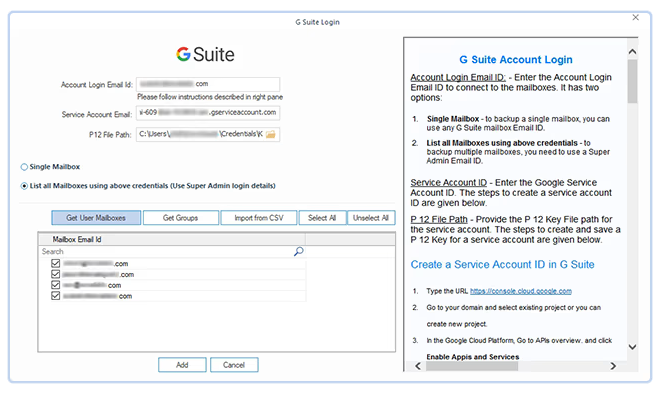
After launching the Google Workspace, users need to add a G Suite account to initiate a Google Workspace data backup. There are three steps to add a G Suite account with this software.
Filters for selective backup
The software has multiple filters that offer a wide range of options to backup selective data from Google Workspace. Here are some prime filters to specify the backup process.
Select Output format and backup
The Google Workspace Backup software has an advanced Save As wizard that allows users to backup their data in the desired format. Check out all the prominent features of this wizard:
What can you backup and restore with our software?
Check out all the Workspace elements that our tool backup and restore from Workspace account:
Backup Google emails
Backup Google Workspace emails and folders, including Inbox, Sent, Trash, Draft, Spam, and more, while retaining its complete structure, metadata, and email status such that the read unread status.
Backup Google contacts
Your Google Workspace contacts are precious for your business, and this G Suite backup software protects data by saving them in various formats, including PST. Choose the Contact folder for a selective Google Contacts backup using an Item Type Filter option.
Backup Google Calendar/Appointments
Save the complete Google Workspace upcoming meetings and appointments using the G Suite Backup tool. It saves all the essential data, including date, description, and member details. Simply select Calendar/Appointments and backup them in the original hierarchy.
Backup Google Drive data
Regular backups of all Google Drive data, including docs, files, folders, drive links, and their properties, should be taken to avoid overcrowding of data. Safeguard your Google Drive data with this G Suite Backup software.
Restore Outlook emails
Restore active or inactive Outlook account’s PST files in the Google Workspace accounts. The software has no size or number limitation and restores large-sized mailboxes to multiple Workspace accounts.
Restore Contacts
Outlook address books store the sender's essential contacts in the PST files. The software restores all the contacts from the address books and skips other content in the selective Google Workspace account.
Restore Calendar
Equipped with advanced filters, this software allows users to restore appointments to Google Workspace accounts. The software restores all the calendar’s appointments with its data, such as sending and receiver’s users, topics, dates, and many more.
Frequently asked questions about Google Workspace backup tool
How to backup Google Workspace data with Kernel Google Workspace Backup & Restore?
The G Suite backup software is relatively easy to use, and these are the steps to backup Google Workspace:
Step 1: Launch the G Suite backup tool and click on +Add to add G Suite mailboxes.
Step 2: Enter the required login details - User Login Email ID, Service Account Email ID, & P12 file Path. Choose between Single or Multiple mailboxes.
Step 3: It will list the mailboxes in the Source list. Click on the Set Filter and Migrate option.
Step 4: The software will show all the folders available in the account.
Step 5: Select desired filters and choose folders. Click on I am OK, Start Migration.
Step 6: Select the output type from available formats- PST, MSG, EML, PDF, DOC, DOCX, HTML, and MHT. Click on OK.
Step 7: Now, select the destination path and press "OK."
Step 8: The migration process will be completed shortly.
With this process you can easily backup G Suite emails and other components.
What are the filter options available in the G Suite Mail backup tool?
The filter page of the software provides several filtering options like Date, Folder selection, Item selection, an option to save the mailbox hierarchy in a single folder, and the option to skip previously migrated items.
What are the limitations of using the trial version of the software?
The G Suite backup software demo version gives you a glimpse of the complete backup process. It will backup 10 items per folder and 5 documents per drive.
How does the tool maintain the encryption of the emails?
The Google Workspace Backup tool supports the backup of encrypted emails and will have the same encryption level during the backup.
How can I control the backup size when I backups G Suite data periodically?
If you have taken the backup of the same mailbox earlier, you will get a unique option to skip the previously migrated items. In incremental migration, you can take the backup of only the new data and avoid mixing it with the previously backed-up items.
Can I backup only the Google Drive data, excluding other apps from the G Suite account?
Yes, you can choose only the Google Drive part for backup G Suite Drive Data. On the filter page, uncheck all items and check Google Drive only.
What is the benefit of using a CSV file?
The CSV file helps to reduce the number of steps required to backup multiple mailboxes. You can download a sample CSV file, input it with the required details, and import it into the tool. Also, you can use the CSV file multiple times while taking the backup.
How does the software save the data in the output files for multiple accounts?
It also creates multiple output files to backup numerous accounts. The name of the output files will be the same as that of the selected accounts.
I have created multiple folders in the mailbox to save some emails separately. Will the software access such folders?
Yes, it can backup G Suite emails and folders in the mailbox. It will also include the user-defined folders that you have created.
What credentials are required to backup G Suite mailboxes?
The Google Workspace backup tool requires the G Suite Account Login email ID, the Service Account ID, and P 12 Key. The P 12 key helps to connect to your mailboxes.
What does the P 12 key do for the service account?
A Service account is a special account for using Google API programming. It creates a key to access the account without additional authentication. You need the P 12 key to connect our tool with the service account.
What is the need for a Super Administrator account to backup multiple accounts?
A Super Administrator has greater control over Google Cloud resources. It has irrevocable administrative permissions that can control Google apps like Docs, Sheets, Drive, user mailboxes, etc. A super administrator can also create a service account with the authority to access other Google apps. When you want to take a backup of multiple accounts, then you need the Super Administrator account ID to access the accounts of all the users.
Does the tool restore corrupt PST files to Workspace accounts?
Google Workspace Restore Tool supports all kinds of healthy PST files created in Outlook. You can restore such PST files in Workspace whose content is stored in the active mailboxes.
I have a PST file with 28 GB in size. Can I restore it to single Workspace accounts?
Yes, if there is enough space in Workspace account, then you can restore the PST file in it. There is no size limitation in our software.
I did not check the PST file before restoration. How to stop such folders in which there is no data?
At the filter page, there is an option to ‘exclude empty folders’. So, it will stop the empty folders from migration.
Can I search and restore a specific file or folder in Google Workspace?
Yes, our software provides a Review tab where users can select their essential files or folders and restore them in their Google Workspace account.
Can I back up Gmail and Google Drive’s Trash folder?
The software has advanced algorithms that can easily backup Gmail and Google Drive Trash folders or files with their attachments & properties.
What happens to backup data if a user account is deleted?
Google offers a retention period of 30 days for any data you delete from your Google account. But if you have your backup stored outside your Google environment, then it will be safe and not affected when you delete a user's account.
Can G Suite backup help protect against ransomware or data loss?
Yes. With a complete data backup, you can recover from a ransomware attack or human error data loss. Therefore, you must invest in a high-quality backup tool like our Kernel for Google Workspace backup and restore that allows quick and accurate backup of all your G Suite components.
Is there a way to back up G Suite data for multiple users at once?
You can use Google’s Data Export tool to back up multiple users' data. However, this method requires you to have specific permissions and, depending on the size of the data, could take weeks to complete. So, we recommend you opt for the Kernel Google Workspace Backup and Restore tool to backup bulk users' data without any restrictions.
Why is G Suite backup essential for remote or hybrid work environments?
Managing data security outside the boundary of your office premises is challenging. If you have multiple employees working remotely, the risk associated with data increases. Therefore, it becomes even more essential to have a robust backup mechanism to safeguard your confidential data from loss or leak.
Why doesn't Google Workspace offer full backup and restore functionality natively?
While Google does offer data retention features, it does not provide a complete solution for data backup. Google follows a shared responsibility model. According to it, Google will secure the infrastructure, and the users will protect their data. Therefore, to make sure your data is safe, it’s vital you have a reliable Google Workspace backup tool.
Why are my suspended users' data not available in backup?
Google restricts the backup of a suspended user. You can only access this data if you are the administrator. Third-party tool uses API to get the user’s data, but the API doesn’t allow access to the data for creating a backup for the suspended user. Therefore, you are not able to find the data of your suspended users.
Why am I required to back up my Google Workspace data?
A backup allows you to safeguard your data and helps with quick recovery against various threats like human error, virus attacks, database corruption, etc.
Why do IT teams prefer automated G Suite backups over manual exports?
An automated G Suite backup tool allows users to:
Take quick and accurate backups of multiple users simultaneously.
Provide various filters to help users migrate only the important data.
Configure and schedule the backup for a later time, avoiding downtime.
Export mailboxes to multiple formats and make them accessible on different platforms.
Google Workspace backup software
Prerequisites & recommendations
About Software
Version: 25.0
Release Date: May 2025
License Type: No. of mailboxes
Version Support
Google Workspace: All plans and subscriptions for Google Workspace, Business, Enterprise, Essentials, Frontline, Individual, and Education.
Outlook PST File: 2019, 2016, 2013, 2010, 2007, 2003, 2002, 2000, 98 and 97
System Requirements
Hard Disk: 500 MB of disk space
Memory: 128 MB Minimum
Processor: Intel® Pentium Processor compatible (x86, x64) or equivalent
Operating System: Windows 365, 11, 10, 8.1, 8, 7, Vista, XP, 2000, 98, NT, 95 (FAT 16, FAT 32, NTFS, NTFS5)
Windows Server 2022, 2019, 2016, 2012, 2008 R2, 2008, 2003 R2, 2003
What customers say about Kernel Google Workspace Backup and Restore
(4.9/5) 455 Reviews
Outstanding tool for G Suite users
Kernel G Suite Backup proves to be an outstanding tool, efficiently splitting my sizable PST files and simplifying the entire process for me. The software's excellent user interface further enhances its usability, providing a seamless and user-friendly experience.
Alexia Francis

© Copyright 2000-2025 COGITO SOFTWARE CO.,LTD. All rights reserved










