|
|
|
|
|
|
|
Import PST to Office 365 with Top Rated Migration Software
2M+ Downloads
Kernel Import PST to Office 365 tool allows users to import Outlook mailboxes to the desired Office 365 tenant with zero data loss guarantee. Designed for IT professionals and businesses, the software simplifies migrating complete PST data, including emails, contacts, calendars, attachments, etc., to Office 365.
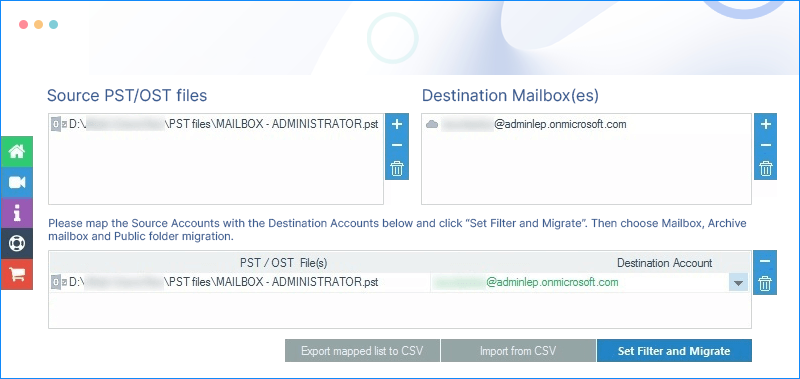
What's new inKernel Import PST to Office 365 v24.2
190+COUNTRIES WORLDWIDE
20YEARS' EXPERIENCE
24x7CUSTOMER SUPPORT
When to use Kernel Import PST to Office 365 tool?
Get the advanced solution to simplify the migration process. IT administrators and enterprises migrate thousands of PSTs to Microsoft 365 with zero disruption and downtime:
Migrate On-Premises Outlook to Cloud
Switching from on-premises Outlook to cloud (Office 365) is easier with the PST to Office 365 migration tool. Import desired mailboxes containing emails, contacts, calendars, etc., from PSTs to Office 365 mailboxes (primary, archive, or shared mailboxes).
Consolidate or Merge Multiple Mailboxes
Use the PST Import tool for Office 365 to consolidate or merge multiple Outlook mailboxes from different users or computers. Support an easy procedure to import multiple PST files containing different mailboxes within an Office 365 tenant.
Recover Data from PST Files
Recovering data from inaccessible, old, or archive PST files is possible with the PST to Office 365 migration tool. With the solution, import PST file data to Office 365 mailboxes or groups in compliance with industry regulations.
How to Import PST to Office 365?
Here is a three-step process to easily import PST files to Office 365 using the software:
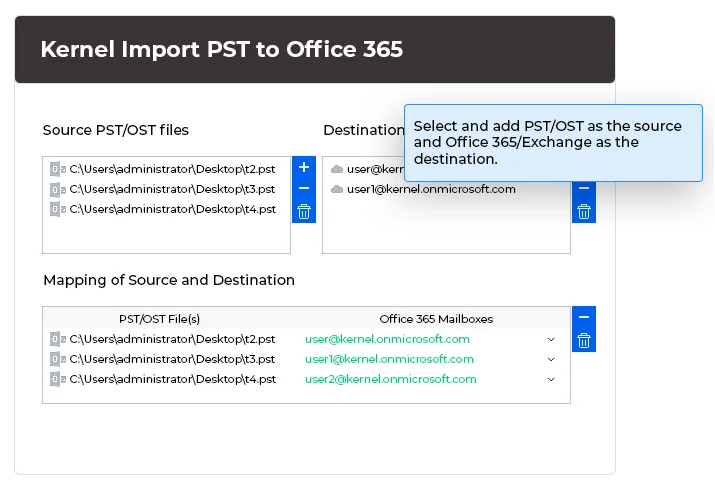
Select PST file:
Select a PST file and incorporate it into the process to import PST file in Office 365.
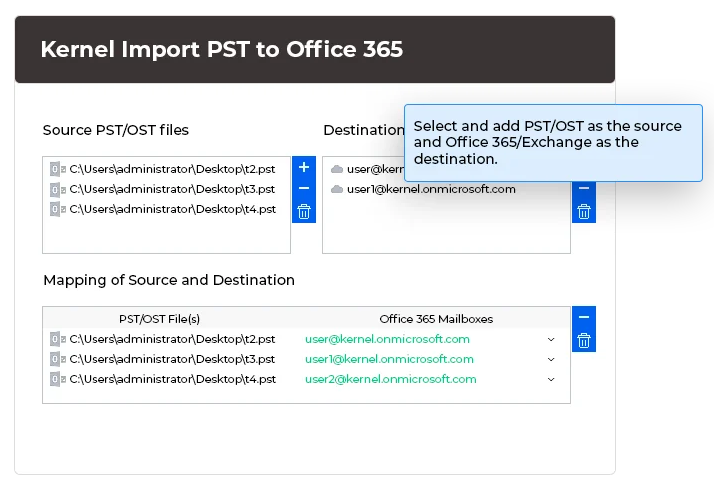
Map source to destination:
To maintain the hierarchy of data, map the mailbox from source to destination.
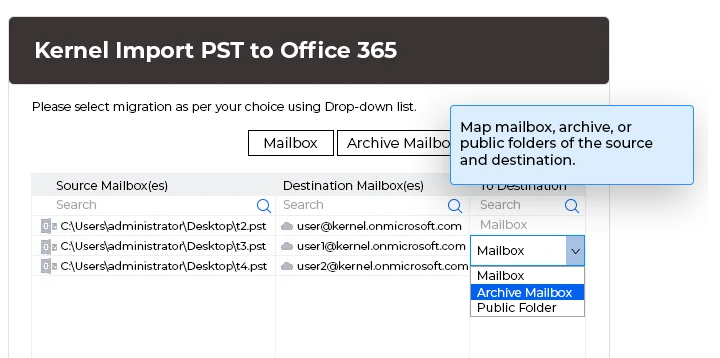
Import to Office 365:
Import specific data from PST file to Office 365 using the advanced filter options.
Top Features of PST to Office 365 Migration Tool
Explore the exclusive and advanced features of the Kernel Import PST to Office 365 tool that make it a go-to solution for every user.
Import PST with two authentication modes
The Import PST file to Office 365 tool supports Basic as well as Modern Authentication to migrate PST to Office 365 in just three easy steps. Use Basic authentication for easy and secure login. However, use Modern authentication to add an additional layer of security to prevent data loss.
Import PST files to Office 365
Download Import PST files to Office 365 tool excels that allows you to move PST files to multiple mailboxes in a single attempt. Use login credentials to import PST files to a single user account or use the Global administrator credentials to migrate PST files to multiple mailboxes simultaneously.
Import OST to Microsoft 365
Apart from importing PST files, the software also permits you to import OST to Office 365 mailboxes and Groups. Browse the desired single or multiple files to move the stored mailboxes, retaining the original hierarchy during the OST to Microsoft 365 migration.
Efficient mapping with CSV file
Allow Office 365 Administrators to automate the mapping process with the pre-mapped CSV file. Simply download a blank CSV, input the required source and destination details, and upload it. Eliminates manual selection of each mailbox from the added PSTs to import PST file in Office 365.
Import PST to Exchange Server
With the Import PST files to Office 365 tool, migrate single as well as multiple PST files to the Exchange Server. Highly compatible with all the Exchange server versions, including 2010, 2013, 2016, etc., and supports a smooth PST file import to On-premises, Hosted, or Online Exchange.
Import PST files to Office 365 Archive mailboxes
Allows users and administrators to upload PST to Office 365 Archive mailboxes, Primary mailboxes, and Public folders. Permits you to easily select the destination to avoid transferring the data to unintended users’ mailboxes, create a new folder, and import all data inside it.
Import email along with attachments
Attachments containing crucial business information are transferred with other mailbox data. The Import PST to Office 365 tool simplifies the import of PST emails with attachments, supporting zero data loss. Migrate all Outlook mailbox items, including emails, contacts, calendars, etc.
Run multiple import tasks simultaneously
The software allows you to run multiple import PST file to Office 365 tasks simultaneously to save your time and boost efficiency. Instead of waiting for one task to finish, you can run multiple ones to ensure quicker and more accurate results.
Move contacts and calendars to Office 365
With PST to Office 365 migration tool, it’s easy to move calendars, contacts, and other mailbox folders separately. Simply add the PST file to the tool and follow some simple steps as prompted, which will streamline the process to import Outlook PST contacts to Office 365.
Advanced filtering options
Kernel Import PST to Office 365 tool includes advanced filtering options to import data precisely. Support filters like date range, item type, and exclude deleted items & empty folders. Additionally, migrate the entire hierarchy to a single folder and name it after the source PST file.
Skips previously imported items
Avoid duplicity and confusion by using the Skip Previously Migrated Items option. Select the feature to automatically leave out the mailbox items already migrated in previous data transfers. Permits you to import PST files to Office 365 with relevant data only for 100% accuracy.
Import PST without installing Outlook
No need to install Outlook application on the system to import PST file to Office 365. The tool allows to move PST to Office 365 without installing the email client (Outlook) while keeping the original folder structure and data intact during this data transmission process.
Save the log report after import
After the completion of a successful PST file import into the Microsoft 365 account, you can save the report in CSV format to thoroughly analyze the whole process. Log report provides insights into the number of folders migrated successfully, their type, and errors (if any).
Advanced compatibility to Outlook and Windows
Import PST to Office 365 tool works well with all major Outlook versions, including 2021, 2019, 2016, 2013, 2010, 2007, 2003, 2002, 2000, 98 and 97. It is also highly compatible with Windows 365, 11, 10, 8.1, and Windows Server 2022, 2019, 2016, 2012, 2008 R2, 2008, 2003 R2, 2003 OS.
Preserve folder hierarchy
With the Import PST file to Office 365 tool, the folder hierarchy of the mailboxes within the PST file is preserved during the process. All the data stored within the mailboxes in the PST file remains as it is with no manipulation when you move PST to Office 365.
What benefits does Kernel Import PST to Office 365 offer?
Import large files
The import PST file in Office 365 tool supports a maximum file size of 50 GB, and permits you to import large files to the Office 365 cloud account. Migrate multiple large PST files to Office 365 without any size limitations and quicker than any manual method.
No post-import jobs
Requires no post-import jobs to move PST files to Office 365. After importing the mailboxes from PST to Office 365, the mailbox folders and their items are readily accessible as they were in the initial mailboxes.
Retain email status
The status of multiple unread emails available in the mailbox before the transfer will be protected throughout the process. The unread email will remain unread. The Import PST to Office 365 software also supports the UNICODE characters.
Support to all Office 365 plans
With this advanced software, users can easily import PST files into Office 365 without any restrictions. It supports all the Microsoft 365 plans that include Exchange Online, including Business, Basic, Business Standard, Business Premium, Enterprise, etc.
Perform bulk transfer
Perform bulk mailbox transfer using PST to Office 365 migration tool without causing interruptions. Select and add multiple Outlook PST files at once and then upload them directly to the Office 365 tenant in one go.
User-friendly interface
User-friendly and self-descriptive interface of the import PST to Office 365 tool makes it easy to upload PST to Office 365 in just a few steps. Non-technical users will face no hassles while navigating through the tool.
Why import PST file to Microsoft Office 365?
Import PST to Office 365 tool allows users to migrate email data, such as messages, contacts, and calendars, from Outlook to the cloud-based Office 365 environment. This process ensures that all important data is consolidated in one place, which makes it easier to access and manage through Office 365. It is particularly useful during email migrations, backups, or when transitioning from an on-premises email server to Office 365.
What does manual import to Office 365 offer?
What manual import to Office 365 does not offer?
Import PST to Office 365 Tool - Trial & Licensed Version Features Comparison
|
Features |
Trial Version |
Licensed Version |
|
Migrate PST Files to Office 365 |
10 items per folder |
√ |
|
Import to Public, Archive, & Mailbox folders in Office 365 |
10 items per folder |
√ |
|
CSV Import Feature |
√ |
√ |
|
Preview OST/PST Data |
√ |
√ |
|
Transfer Contacts & Calendar |
√ |
√ |
|
Secure Authentication Modes |
√ |
√ |
|
Supports Bulk PST Import |
√ |
√ |
|
24*7 Tech Support & 100% Secure |
√ |
√ |
PST to Office 365 Migration tool FAQs
How to import PST files to Office 365 using this software?
The following steps will quickly help you to migrate PST to Office 365 mailbox account:
Step 1: Download and install Kernel Import PST to Office 365 software.
Step 2: Open the software, click on +Add in the Add Source panel and choose PST file.
Step 3: Click on +Add in the Add Destination panel, choose the Login type, and mention the Microsoft 365 credentials.
Step 4: Choose Single/Archive mailbox and Map the Source to the Destination. Select Set Filter and Migrate.
Step 5: Select amongst Mailbox, Archive Mailbox, and Public Folder. And click on Migrate to continue.
Step 6: Apply desired filters to migrate PST files to Office 365 selectively.
Step 7: Click I am OK, Start Migration, and save the log report once completed.
Repeat the same process to move PST to Office 365 for the migration of bulk files with administrator privileges.
Can I move only the contact details to Office 365?
Yes, indeed, you can migrate the contact information selectively. The Filter Selection window has an Item Type filter feature; choose the Contacts option and uncheck all the others.
Can I import multiple PSTs to multiple Office 365 accounts? Which license of the software should I buy?
Yes, you can select multiple PST files as Source and add various Office 365 accounts in Destination using user or administrator accounts. Also, you can add user accounts of different Office 365 domains at the same time.
Home User License- This is suitable for users wanting it for personal use It can be installed on up to 2 computers to import your personal Outlook PST files.
Corporate License- If you are buying the Software for your organization, this license is the best choice. It can be installed on multiple computers within an organization at a single location.
Technician License- This is highly suggested if you buy the Software to provide services to other users. It can be installed on various computers at different locations.
I tried to add the Exchange mailbox as a destination, but the tool showed an error HTTP Status 401: Unauthorized. How can I resolve it?
You may get such an error when the Username Principal Name (UPN) is different from the email address. To resolve the error, enter both the UPN and the email address.
Is it possible to import specific mailboxes during the PST migration to Office 365?
Yes, you can import specific mailboxes, folders, or items from the PST file with the help of filtering options to migrate PST files to Office 365.
Will I have to create a new PST file or import an existing one?
A PST file with a mailbox is required in an online Microsoft 365 account. You don't need to create a new PST file explicitly.
In my PST files, there are several empty folders and I do not want to import them. How can I tackle it?
Before you import a PST to Office 365, you can apply a filter ‘Exclude empty folders’ and they will not be migrated.
Will the software migrate an archive PST file?
Yes, the software can import an archive PST file too.
In my PST file, more than a hundred folders are in the mailbox. I created many folders to move relevant emails in them. Is there a limitation in the software to move several folders in the PST file?
No, there is no limitation related to the number of folders present in the PST file. So, when you import PST file to Outlook 365, it will migrate all the folders that you have created.
Can I Import PST in Exchange Online and access my data in the original hierarchy?
Yes, the software can easily import PST in Exchange Online and retrieve entire data in the original hierarchy with the “Save all data hierarchy into a separate folder” option.
What will be the message size limit while importing PST file to Office 365?
Office 365 follows the size limit for Exchange Online emails, which is 150 MB. So, if an email is beyond that size, the software will skip it. The standard size of an email will be 25 MB, and the maximum supported email size will be 150 MB.
Does the software also allow to import OST files to Office 365?
Yes, you can. The software lets you import both PST as well as OST files to Office 365. In the source section, you can add either PST files or OST files.
Does this tool support to import PST to Office 365 from Outlook 2019?
Yes, with this Import PST to Outlook 365 tool, you can easily migrate PST to Office 365 irrespective of the Outlook versions.
Can I check the data stored in PST files before I move PST to Office 365?
Yes, when you import PST file to Office 365, you can use the Preview feature to go through the mailbox content before migrating PST files to Office 365.
Import PST to Office 365 software Prerequisites & recommendations
About Software
Version: 24.2
Release Date: Feb 2024
License Type: Home, Corporate & Technician
Version Support
MS Outlook: Office 365 Outlook, 2021, 2019, 2016, 2013, 2010, 2007, 2003, 2002, 2000, 98 and 97
System Requirements
Hard Disk: 50 MB of disk space
Memory: 128 MB Minimum
Processor: Intel® Pentium Processor compatible (x86, x64) or equivalent
Operating System: Windows 365, 11, 10, 8.1, and older versions Windows Server 2022, 2019, 2016, 2012, 2008 R2, 2008, 2003 R2, 2003 OS

© Copyright 2000-2026 COGITO SOFTWARE CO.,LTD. All rights reserved










