|
|
|
|
|
|
|
Advanced Cloud Tenant Migration Tool
Effortless & Secure Cloud to Cloud Data Migration!
Trusted by Enterprises and IT Consultants, Kernel Cloud Tenant Migration Tool allows you to easily move users, mailboxes, groups, drives, and workloads between Office 365 tenants or to Google Workspace with Zero Data Loss Guarantee.
All-in-One Cloud Migration Options for Your Business
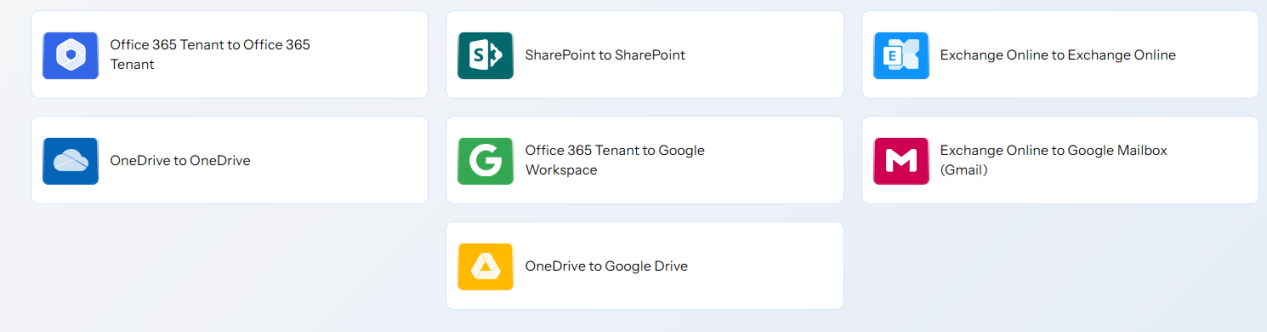
Kernel Cloud Tenant Migration tool covers every migration path your business needs. Explore scenarios across Office 365 and Google Workspace to start your cloud to cloud migration journey.
What Our Cloud Tenant Migration Tool Offers?
Whether tenant-to-tenant or cross-tenant transfers, our tool permits you to migrate data across platforms with complete accuracy and guaranteed results.
Office 365 to Office 365 Migration
Get secure Office 365 tenant to tenant migration with our feature-rich software. It allows you to move users, mailboxes, and associated data with a 100% error-free process. The tool maintains permissions, structure, and hierarchy to make sure your organization experiences a smooth data transfer.
Office 365 Groups to Office 365 Groups
Experience the easiest way to transfer your Office 365 Groups data from one tenant to another with a 100% error-free process. Our tenant to tenant migration tool doesn't just move your data, but it also migrates metadata, permissions, and folder structure without any data loss or disruption.
Exchange Online to Exchange Online
Securely migrate Exchange Online mailboxes between different tenants. The software allows you to transfer all the user mailboxes with original folder structure, contacts, calendars, and data access level intact. It provides guaranteed results for businesses managing tenant consolidations or organizational transitions.
OneDrive to OneDrive Migration
Migrate complete files and folders from one OneDrive account to another with the original file name, folder structure, file version history, and other key attributes. Our tool helps you to go beyond a simple copy-paste job and perform a professional-level OneDrive migration.
SharePoint to SharePoint Migration
The software allows you to execute SharePoint to SharePoint migration with support for both site-level and library-level transfers. Easily migrate entire SharePoint site or specific document libraries, ensuring structures and secure content migration without affecting data integrity.
Office 365 to Google Workspace
Migrate Office 365 users and mailboxes into Google Workspace with ease. The Cloud Tenant Migration tool supports bulk transfer of emails, contacts, calendars, documents, drives, and even chats. It minimizes downtime and helps organizations adopt Google’s collaborative environment smoothly.
Migrate Office 365 Groups to Google Groups
Maintain your team collaboration even when you switch platforms with our tool's ability to migrate Office 365 Groups to Google Workspace Groups. The tool allows moving conversations, memberships, and permissions, along with all your shared data (files, calendar, notes, etc.) and other Group components.
Exchange Online to Google Mailbox
Our Cloud to Cloud Migration tool permits you to move Exchange Online mailboxes to Google mailboxes (Gmail) without any data loss. It migrates emails, contacts, calendars, attachments, etc., mailbox items precisely, while ensuring all your data items migrated to the correct folder.
OneDrive to Google Drive Migration
The Cloud Tenant Migration tool allows you to migrate OneDrive content into Google Drive, including files, folders, and permissions, with complete accuracy. Easily migrate Microsoft file types into the Google-supported file types, enabling users to adapt to Google’s platform without hassle.
Why Choose Our Cloud Tenant Migration Tool
Chosen by IT admins worldwide, this tool ensures smooth, seamless, and accurate cloud tenant migrations without disruption.
Lightning-Fast Migration
Experience high-speed tenant to tenant migration with our software. It lets your team stay productive and avoid delays during the entire process.
Everything Stays Organized
Easily transfer emails, documents, calendars, contacts, drives, chats, and other Office 365 workloads with complete integrity to make sure nothing is lost.
100% Secure Process
Our Tenant to Tenant Migration software ensures zero data loss and keeps sensitive data secure throughout the migration with enterprise-grade encryption and strong security standards.
Trial Version
Download a trial version of the Cloud Tenant Migration tool and migrate the data of one user with limited capabilities, valid for 15 days. For an extended evaluation period or additional assistance, contact our support team.
Hassle-Free Setup
Start cloud to cloud migration without complications. The software’s simple interface and guided steps let you begin quickly, even without deep technical knowledge.
24*7 Customer Support
Our dedicated support team is always available via chat, call, and email to provide complete assistance and quickly resolve migration challenges when needed.
Key Features You Get with Our Tool
Explore the top features of our robust Cloud Tenant Migration tool that helps you get easy and secure data migration from one cloud to another.
Easily Create Projects and Jobs
The tenant to tenant migration tool allows you to create multiple projects and jobs within a single dashboard, making it easier to manage and organize different migration tasks separately without confusion. This advanced feature of the software helps in structured and error-free migration handling.
Source & Destination Connector
The software lets you add multiple sources and destinations without any restrictions. Users can connect the required source and destination to initiate the migration with guaranteed results. Easily handle bulk or large-scale data transfers across multiple tenants while keeping everything under control.
Bulk Data Migration
Use CSV authentication to save your selected users and groups. Later, import the same file to run bulk migrations. This way, you avoid the repeated task of selecting the same users and groups again and make the migration faster and completely hassle-free.
Search Specific Users & Groups
The software includes a smart search option to find specific users and groups in both source and destination. Instead of scrolling through long lists, you can easily locate and select the specific users and groups to keep the migration setup accurate and convenient.
Advanced Users & Groups Mapping
With the software’s advanced mapping feature, you can map or connect users and groups between source and destination tenants. It makes sure that all files, folders, permissions, and content are transferred correctly. Maintain accuracy, keep data safe, and avoid errors during migration.
User Creation in Destination
The software allows you to create users in the destination tenant with password protection. It keeps secure access from the beginning, simplifies account setup, and protects your data. Safely perform cloud to tenant migration without worrying about unauthorized access.
Group Creation in Destination
For organized and better data migration, create groups in the destination tenant. The Cloud Tenant Migration tool also allows you to manage the members of the created groups to make sure accurate data migration without any hassle.
Filters for Specific Data Migration
Our Cloud to Cloud migration tool offers multiple advanced filters, such as date filters, folder or file filters, items, and more, to make migration precise and more flexible. It permits you to choose specific data for migration, instead of transferring all files together.
Pre-migration Analysis
Review the complete migration summary before initiating the cloud to cloud migration. The software allows you to verify details like source, destination, selected items, etc., and make changes if required. Maintain accuracy and prevent errors before the actual migration begins.
Manage Large Scale Migrations
Run the Cloud Tenant migration software in multiple instances for different migration scenarios using unique project and job names. You can start different jobs in parallel, saving time and increasing efficiency. It is especially useful for large projects where you need to handle multiple tenants together.
Incremental Migration
The Cloud Tenant Migration tool allows you to migrate only new or modified items after the first transfer. You can also choose to ignore duplicate mails during migration. Any duplicate items found are listed separately in a ‘Duplicate Items’ folder for easy review and management.
Automate Cloud Migration
The software lets you decide when to start migration. Start it immediately or schedule it in advance to run once or on a daily, weekly, or monthly basis as per your need. It helps in making the process flexible and time-saving with guaranteed results.
Multiple Job Management Options
The software provides multiple job management options between migrations to ensure a 100% error-free process. It allows you to create, pause, stop, or remove jobs anytime. You can also refresh progress instantly, giving you complete control over every migration task.
Real Time Migration Tracking
The software provides a live migration summary with two clear views, including current migration status and currently migrating data. It shows details like source, destination, data type, item count, processed size, duplicates, filtered, and failed items to keep the entire migration process transparent.
Post Migration Validation
The software permits you to generate a detailed migration report that you can save in CSV format. It includes session number, start and end time, status, remarks, and other details to help you easily analyze and maintain accurate tenant to cloud migration records.
What Industry Experts Say About Us
Daryl Mitchell
CIO
Our organization had to move thousands of mailboxes from Office 365 to Google Workspace after restructuring. Honestly, I was nervous about such a large project, but Kernel Cloud Tenant Migration tool handled it really well. The process was organized, errorfree, and our employees barely noticed the change because access was uninterrupted.
Michael Rodriguez
Migration Specialist
I've tried many migration tools in the past, and most require a lot of manual handling.
What I liked about this tenant to tenant migration tool is that it effortlessly migrates complete data,whether moving OneDrive, SharePoint,or Exchange.Its simple interface and detailed migration report makes the whole process easy for my team and saved their hours of repetitive work.
Sophie Wagner
Cloud Architect
After our company merger, we had two different Office 365 tenants that needed to be merged. Normally, this would take weeks of careful planning and execution, but the Kernel Cloud Tenant Migration tool made it too simple. We could monitor every step, make sure data integrity, and complete the migration without affecting day-to-day operations.
David Thompson
IT Consultant
I help small and mid-size companies to move between platforms, and migrations are usually the most stressful part. With this cloud to cloud migration tool, I was surprised at how smoothly everything moved, from emails to groups and drives. My clients were happy because there was no downtime, and I could finally deliver projects faster with complete accuracy.
Prerequisites & Recommendations
About Software
Version: 25.0
Release Date: September 2025
License Type: Tenant to Tenant, Cross Tenant, Multiple Tenants Migration
Trial Limitation: Download the Kernel Cloud Tenant Migration Tool and start your 15-day trial to migrate a single mailbox (100 emails per folder).
Version Support
Windows Operating System (both 32-bit and 64-bit editions): Windows 365, 11, 10, 8.1, 8; Windows Server 2022, 2019, 2016, 2012, and 2008
Virtual Environments: Microsoft Virtual PC, VMware ESXi Server, VMware ESX Server, Hyper-V Server 2019, 2012 R2, 2012, 2008 R2, 2008
Office 365 (Microsoft 365): All plans, including Office 365 (Microsoft 365) Enterprise E1, E3, E5 & Exchange Online Plan 1, 2, Microsoft 365 Business Premium, Office 365 A1, Office 365 A3, Office 365 A5, Office 365 F1, and Office 365 Business Essentials.
Google Workspace: All plans and subscriptions for Google Workspace, Business, Enterprise, Essentials, Frontline, Individual, and Education.
System Requirements
Hard Disk: At least 500 MB for installation and 5 GB of free space for storing data and logs.
RAM: Minimum 8 GB (16 GB recommended for best performance)
Processor: Minimum 4-core (8-core recommended) Intel® Pentium Processor
Prerequisites: Requires Internet Connectivity, .NET Framework 4.6 or later, Microsoft Visual C++ 2015-22022 Redistributable (x86)

© Copyright 2000-2026 COGITO SOFTWARE CO.,LTD. All rights reserved










