
rating5(4.9/5) 536 Reviews
Effective tool for removing NSF file local security
2M+ Downloads
Remove NSF local security with this tool. This tool efficiently removes restrictions imposed by the Access Control List, enabling seamless access and editing of NSF files while resolving authorization issues.
Download the trial version and remove restrictions from NSF up to 5 MB file size.
190+ COUNTRIES WORLDWIDE
20 YEARS' EXPERIENCE
24x7 CUSTOMER SUPPORT
What's new in
Kernel for NSF Local Security Removal
Top use cases for Kernel for NSF Local Security Removal
Swift removal of HCL Notes local security restrictions
When faced with the need for quick removal of HCL Notes local security, our NSF Local Security Removal tool stands as the ideal solution. With a straightforward process, this software eliminates restrictions from selected HCL Notes files with just a single mouse click. It ensures a quick and hassle-free experience without consuming additional time. Additionally, the tool preserves file encryption during the removal of local restrictions, providing a seamless solution for securing your data.
Effortless removal of Lotus Notes NSF File local security
When you need to remove local security restrictions from Lotus Notes NSF files, rely on NSF Local Security Removal. Specifically designed to remove restrictions imposed using the Access Control List of Lotus Notes, this software ensures a smooth removal process while retaining the original structure and properties of NSF files. It guarantees a secure transformation without any alteration to the data, making it the ideal tool for uncomplicated removal of local security from Lotus Notes files.
Remove local security from NSF files without size limitations
When in need of a straightforward and user-friendly solution without any size restrictions for removing local security from NSF files, turn to NSF Local Security Removal tool. It allows users to remove local security restrictions from multiple NSF files without limitations on size. Additionally, the software is not constrained by Lotus Notes versions or file sizes, ensuring easy operation and flexibility. Opt for this tool to eliminate local security constraints across a variety of NSF files.
How to
remove Local NSF Security?
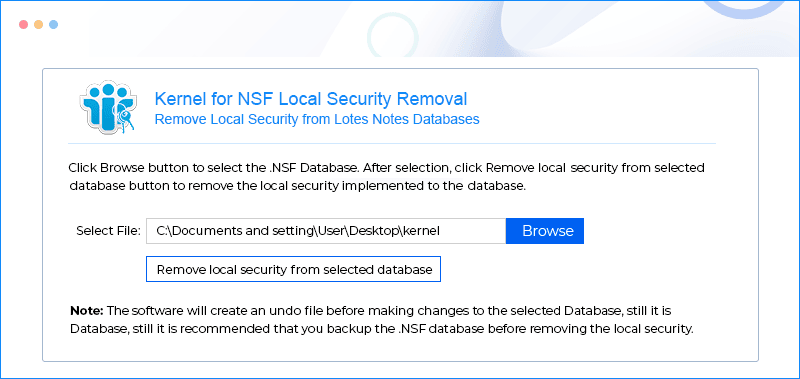
This smart Kernel for NSF Local Security Removal utility proves very handy in removing all the local securities from the secured NSF database of Lotus Notes. Using this Kernel for NSF Local Security Removal, the steps that you need to follow are:
Select the NSF file:
Click on Browse to navigate and select the NSF file.
Remove local restrictions:
Click the Remove local security from selected database button to lift the restrictions.
Save the file:
Specify a location on you local system to save the file with removed restrictions.
Explore software’s key capabilities
Explore the software’s important capabilities to know better about its functionalities.
Quick security removal
Facilitate swift local security removal with Kernel for NSF Local Security Removal. Select the NSF file and eliminate restrictions with a single click. This utility simplifies the process, requiring only a few keystrokes to remove securities from NSF databases.
Assured data integrity
Safeguard your data confidently using Kernel for NSF Local Security Removal. Eliminate database securities while preserving the integrity of NSF file structure and properties. Rest assured, the software ensures no alteration or loss of data during the process.
Undo restriction removal action
During the removal of restrictions from the NSF file, the tool creates an NUS file stored in your system. It serves as an UNDO file, allowing users to reverse the restriction removal action on the unrestricted NSF file if needed.
Retains the encryption in the NSF file
When removing local restrictions, the tool preserves encryption in NSF files, if present. Consequently, the tool cannot be employed to resolve the "This database has local access protection, and you're not authorized to access it locally" error.
Solves access restriction issues
Rectify access errors in restricted Notes NSF files with the Security Removal tool. Employing robust algorithms, it swiftly eliminates restrictions, resolving access-related issues and ensuring seamless access to the files without any error.
Fixes two common errors
Unlock restricted NSF files by utilizing this tool, which eliminates access rights and privileges. If error messages such as "You are not authorized to access that database" or "You are not authorized to perform that operation" arise, employ this solution for seamless access.
Simple and easy-to-Use
Facilitate access rights removal with this user-friendly application, demanding no hardcore technical skills. Average users can effortlessly navigate the tool's descriptive screens and friendly interface to eliminate access rights and privileges from NSF files.
Supports all NSF Versions
Ensure compatibility across all Lotus Notes versions with this software. Programmed to seamlessly run on various Windows platforms, it allows you to remove restrictions from any NSF file without concerns about Lotus Notes version compatibility.
Frequently asked questions
How to remove security from Notes NSF database file with Kernel for NSF Local Security Removal tool?
The steps to remove security from the NSF database file through the Kernel for NSF Local Security Removal tool are:
Step 1: Launch the Kernel for NSF Local Security Removal tool.
Step 2: Browse and add the protected NSF database file on your system.
Step 3: Remove security on the database file with a single click.
Step 4: Save the decrypted file in the desired format at the defined path.
Can Kernel for NSF Local Security Removal resolve the 'local access protection' issue preventing authorized access to a database?
No. You cannot use this tool to fix this issue. You should have proper access to the database if you want to use this software.
Can Kernel for NSF Local Security Removal decrypt encrypted NSF files?
No. It cannot perform file decryption. You can use this tool only for removing local security.
What is the difference between the free version and the full version of Kernel for NSF Local Security Removal?
The free version of Kernel for NSF Local Security Removal is being given for evaluation purposes. It can remove security from NSF files of a maximum size of 5 MB only. But the full version works even with larger-sized NSF files.
Software
Prerequisites & recommendations
About Software
Version: 9.10.01
Release Date: Oct 2009
License Type: Home, Corporate & Technician
Version Support
Lotus Notes:IBM SmartCloud™ Notes®, IBM® Verse, 12, 11, 10, 9.0.1, 9.0, 8, 7, 6
System Requirements
Hard Disk: 50 MB of disk space
Memory: 64 MB Minimum
Processor: Intel® Pentium Processor compatible (x86, x64) or equivalent
Operating System: Windows 365, 11, 10, 8.1, 8, 7, Vista, XP, 2000, 98, NT, 95 Windows Server 2022, 2019, 2016, 2012, 2008 R2, 2008, 2003 R2, 2003