
SignalReadercomponentallowsreadingdata fromasignalsourcefile,andplayingitbackwith selectedrate.SignalReaderoutputdata streamformatissimilartoSignalGenerator,seechapter16.10.
SignalReadercomponentcurrentlysupportsacoupleofformats,wavandsid.
17.1Keyproperties
FileNamedefinesthefile toopened,like“c:\\wavedata\\audioclip1.wav”Factorsetstheoutputfactor.Rawsignalsamplesaremultipliedwith thisvalue.OutputIntervalis similartoSignalGenerator’sproperty,seesection16.1.
IsLoopingallowsfilereadtojumptothebeginningofthe file,whentheendoffilehasbeenreached.
Afterthefile hasbeenopened,thefollowingpropertiescanbeusedtogetinformationofthefile:
ChannelCount:thechannelcountofthe file.SamplingFrequency:samplingfrequencyin Hz.FileSize:Filesizeinbytes.
Length:Samplecountforeachchannel.Itmaynotbeexactforall signalfileformats.
IsReaderEnabled:Statustellingisthe componentstartedandreadingdata. IfLoopingissettofalseandendoffileis reached,IsReaderEnabledwillchangetofalse.
17.2Openingfilequicklyforplayback
CallOpenFile(…)methodsuppliedwithafilename.Filenamemusthaveanextensionofsupportedformats.Then, callStart()method
signalReader.OpenFile(“c:\\wavedata\\audioclip1.wav”);
signalReader.Start();
It willstartplaybackofaPCM-formattedWAV file.
PlaybackcanbestoppedbycallingStopRequest()method.
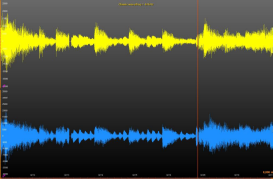
Figure17-1.SignalReaderreadsawavfileandLightningChartSampleDataSeriesdrawthesignal.AcursorlineisusedtomarkcurrentreadingpositionandX-axisscrollposition.
AudioInputcomponentallowsuserto capturesignalfromWindows’recordingdevicetoSystem.Doublevalues.ThesevaluescanthenberenderedonLightningChartUltimate,sendtoan AudioOutputcomponent,savedtoafileetc…
18.1Properties
BitsPerSample–Getsorsetshowmanybitsareallocatedper sample.Supportedvaluesare8and16.If othervalueisused,16isusedinstead.IssettablewhenIsInputEnabledis false.
IsInputEnabled–Getsorsetsthestateofthisinstance(i.e. startsorstopsit).Settingthispropertytrueis thesameascallingStartmethodwherefalseisthesameascallingStopmethod.
IsStereo–Getsorsetswhethertousetwochannels(stereo)orjustone(mono).Issettablewhen
IsInputEnabledis false.
LicenseKey–Getsorsetslicensekeyin normalorencryptedformat.
RecordingDevice–Getsorsetsthe currentrecordingdevice.Is settablewhenIsInputEnabledis false.Bysettingthispropertynull,Windows'defaultrecordingdeviceisused.
SamplesPerSecond–Getsorsetssamplingfrequency.Is settablewhenIsInputEnabledisfalse.
ThreadInvoking–Getsorsetswhetherthisinstanceautomaticallysynchronizesitseventstothemain
UI threadhenceeliminatingtheneedtocall Control.Invokemethodoncaller'sside.
Volume–Getsorsetsvolume(0-100).IssettablewhenIsInputEnabledis false.
18.2Methods
GetRecordingDevices–Usethisstaticmethodtogeta listofavailableWindowsrecordingdevices.
RequestStop–SignalsthisAudioInputinstancetostop.Stopdoesnotoccurimmediatelyafterexitingthismethod.BysubscribingtoStoppedevent,callerisnotifiedwheneverythinghas stopped.
Start–Startsreadingaudiofromselectedrecordingdevice.Startedeventistriggeredwheninternalthreadisabouttostart.
DataGenerated–Occurswhenanewsetofaudiodatahas beengenerated.Dataanditsfirstsample’s
timestampcanbereadfromaDataGeneratedEventArgsobjectthatisprovidedas aparameter.
Started–Occurswhenaudioinputhasbeenstarted.StartedEventArgsobjectthatis providedasa parameter,containsthreepublicfields:BitsPerSample,ChannelCountandSamplesPerSecond.
Stopped–Occurswhenaudioinputhasbeenstopped.
18.4Usage(WinForms)
This chapterdescribestheusageofWinFormsversionofAudioInputclass.WPFversionwillbehandledinchapter17.5.
18.4.1Creation
CreateanewAudioInputinstanceeitherbymanuallyin yoursourcecodeorbydraggingand
droppingitfromVisualStudio’stoolboxonto yourform,usercontroletc.
If youdonotneedtoshowthe GUI(i.e. youuseyourown oryoucontrolAudioInputobjectfromyoursourcecode)then setVisiblepropertyfalse.Parentpropertyisalwaysrecommendedtosetso that whentheparentcontrolis disposedof,AudioInputinstancegetsdisposedof automatically.If thereisnoparentthendonotforgettocallDisposemethodwhen youaredonewithAudioInputinstance.Note,ifyoucreatea newAudioInputinstanceviaVisualStudio’stoolboxthenParentis automaticallyset.
It isrecommendedto setLicenseKeypropertyso thatyourAudioInputinstanceusesanexplicitlicensekeyinsteadoftryingtofindonefromWindows’registry.Note,ifyouareusingatrial version/licensethenyoucanleaveLicenseKeypropertytoitsdefaultvalue.
18.4.2Eventhandling
TogetnewsamplesfromAudioInputinstanceyouneedtosubscribeatleasttoDataGeneratedevent.WhenDataGeneratedeventistriggeredyoucangetthenewsamplesandthefirstsampletimestampfromaDataGeneratedEventArgsobjectprovidedasa parameter.
If youwanttoknowwhenAudioInputinstancehasstarteditsaudiosamplingtaskyousubscribeto Started event.Youcangetthe numberofbits persample,isaudiomonoorstereoandhowmanysamplesper secondaregeneratedfromStartedEventArgsobjectthatisprovidedasa parameter.
If youwanttoknowwhenAudioInputinstancehasstoppedyousubscribetoStoppedevent.Ithasnoparametersanditssolepurposeistotelluserwheneverythinghas beenstopped.

